← Control Systems as Dynamical Systems

Example: Car Cruise Control

Suppose we want to build a robot. If we were hobbyists, we might want a weekend project; if we were engineers, we might need an extra arm on the assembly line; if we were academics, we might dream of a quadruped with a cannon-head to threaten the government for grant money.

Of course, we must begin somewhere. In this notebook, we take a classic example of a feedback system – a car with cruise control – and use pykal to take it from a block diagram to a composition of dynamical systems.

System Overview

We consider here a gross simplification: our car will only ever drive on a perfectly flat plane with minimal drag.

We are given an acceleromoter (which will give us a measurement of our current speed), a button on the steering wheel (which will enable us to modify the cruise control speed), and the car’s CPU (i.e. we can implement any algorithm we want).

Dynamical System Graph

Warning

This section assumes you have already gone through the Dynamical System notebook. If you have not, please do so now.

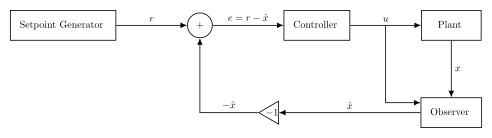
Recall the following block diagram for a simple feedback system:
../../../_images/feedback_system_trad.svg

where \(r\) is the setpoint (or reference point), \(u\) is the control input, \(x\) is the (hidden) state of the plant, \(\hat{x}\) is the state estimate, and \(e\) is the error term.

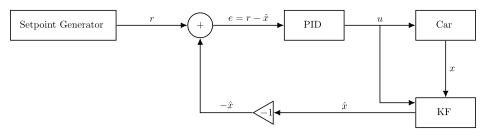
In the case of our car cruise control system, we can leverage this diagram with a simple relabling:
../../../_images/cruise_control_as_a_feedback_system.svg

where the PID is a proportional-integrative-differential control algorithm, KF is a Kalman filter, and the car is, well, the car.

Note

If you were to ask five control theorists to design a block diagram, you would get six different diagrams. Don’t fret the particulars; the diagram is simply a tool to organize our thinking.

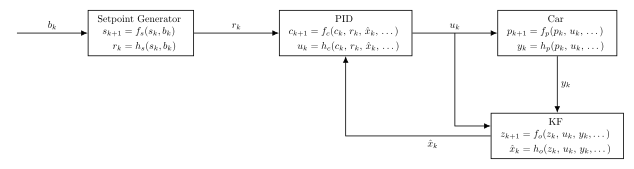
We now proceed with casting the block diagram defined above as dynamical system graph:
../../../_images/cruise_control_as_a_composition_of_dynamical_systems.svg

We construct this graph block-by-block in the sections that follow.

Note

Although the signals between blocks have remained, for the most part, unchanged, the summing junction and inverter have dissapeared. Indeed, they’ve been absorbed into the PID block, as our implementation of the algorithm computes the error term internally.

Block 1: Setpoint Generator
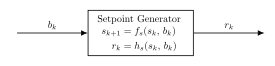
The setpoint generator maintains the cruise control speed reference based on the driver’s button inputs.

# ---- SETPOINT BLOCK ---------------------

#### ARROWS IN ####
bk = int  # button input; bk in {-1, 0, 1} (decrement, neutral, increment)

#### PARAMETERS ############
sk = int
bk = int  # Current setpoint state (cruise control setpoint in mph)

#### ARROWS OUT ####
rk = float

# ---- $(f,h)$-representation --------------

from pykal import DynamicalSystem


def setpoint_f(sk: float, bk: int) -> float:
    """Increment or decrement setpoint based on button input."""
    return sk + bk


def setpoint_h(
    sk: float,
) -> float:
    """Return the current setpoint speed."""
    rk = sk
    return rk


setpoint_block = DynamicalSystem(f=setpoint_f, h=setpoint_h)

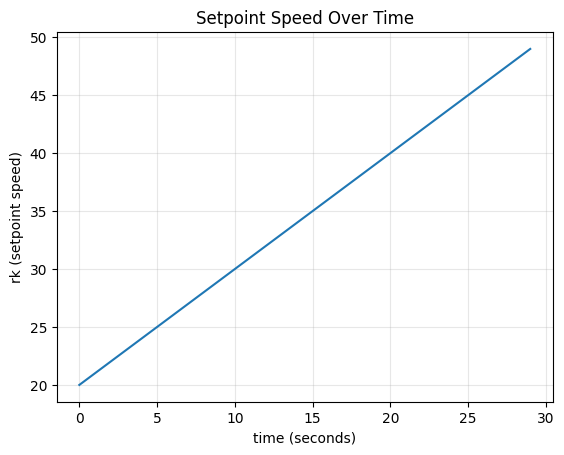
To get a feel for our setpoint dynamical system, we simulate the following scenario: we press up on the button once a second for 30 seconds.

import numpy as np

# ---- SETPOINT GENERATOR BLOCK -------------------

#### ARROWS IN #########################
bk = 1

#### PARAMETERS #########################
sk = 20
bk = bk

#### ARROWS OUT #########################
rk = None
# ---- -------------------

### SIMULATION VARIABLES ############
dt = 1
sim_time = np.arange(0, 30, dt)
rk_hist = []

### SIMULATION ###################################################
for tk in sim_time:
    sk_next, rk = setpoint_block.step(params={"sk": sk, "bk": bk})
    sk = sk_next

    rk_hist.append(rk)
Hide code cell source

# plotting
from matplotlib import pyplot as plt

plt.plot(sim_time, rk_hist)
plt.xlabel("time (seconds)")
plt.ylabel("rk (setpoint speed)")
plt.title("Setpoint Speed Over Time")
plt.grid(True, alpha=0.3)
plt.show()
../../../_images/518b631ac1bbb8b761c0485a1d8d40b2d9f332a4106d2b6ef55da881305f7242.png

Simulating Different Scenarios

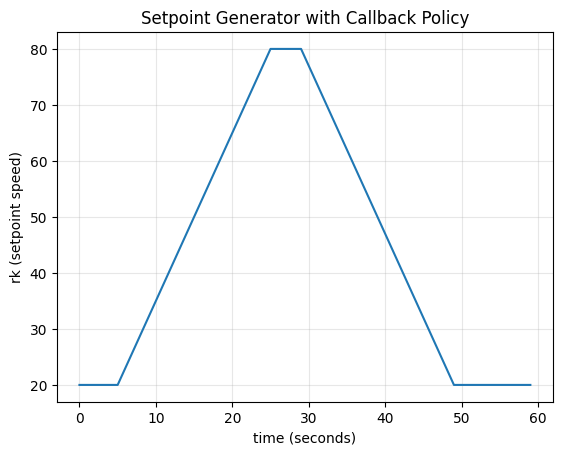
We are limited only by our creativity. Here, we simulate the following scenario:

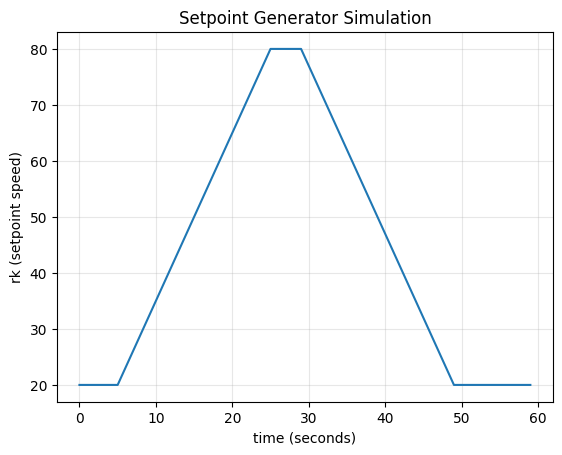
“Our initial setpoint speed is 20 mph. After five seconds, we feel bold and hold “up” on the cruise control button. Since we are holding the button, the button does not increment the speed setpoint once per second but instead at a rate of three times a second (many buttons have a such feature).

Out cruise control maxes out at 80 mph. Once we reach our maximum setpoint speed, we maintain it for five seconds until we wiener out – at which point, we hold “down” on the cruise control button, which decrements three times a second until our setpoint is back at 20 mph.

We can model this scenario easily (note that we are still focusing on the setpoint speed, not the actual speed of the car; that will come later).
Hide code cell source

# ---- SETPOINT GENERATOR BLOCK -------------------

#### ARROWS IN #########################
bk = 0

#### PARAMETERS #########################
sk = 20
bk = bk

#### ARROWS OUT #########################
rk = None
# --------------------------------------

### SIMULATION VARIABLES ##############################
# these are old
dt = 1
sim_time = np.arange(0, 60, dt)
rk_hist = []

# these are new
button_mode = "neutral"  # neutral | ramp_up | hold_max | ramp_down | done
button_rate = 3
max_rk = 80
final_rk = 20
seconds_at_which_we_ramp_up = 5
seconds_to_spend_at_max_rk = 5
seconds_passed_after_hitting_max_rk = 0

### SIMULATION ###################################################
for tk in sim_time:

    # --- Decide bk  ---
    if tk >= seconds_at_which_we_ramp_up and button_mode == "neutral":
        button_mode = "ramp_up"

    if button_mode == "ramp_up":
        bk = 1 * button_rate
        if sk >= max_rk:
            button_mode = "hold_max"

    if button_mode == "hold_max":
        bk = 0.0 * button_rate
        seconds_passed_after_hitting_max_rk += dt

        if seconds_passed_after_hitting_max_rk >= seconds_to_spend_at_max_rk:
            button_mode = "ramp_down"

    if button_mode == "ramp_down":
        bk = -1 * button_rate
        if sk <= final_rk:
            button_mode = "done"
            bk = 0.0 * button_rate

    sk_next, rk = setpoint_block.step(params={"sk": sk, "bk": bk, "max_rk": max_rk})

    rk_hist.append(rk)

    sk = np.clip(sk_next, 0, max_rk)  # set a max setpoint speed, 0 <= sk <= max_rk

Hide code cell source

from matplotlib import pyplot as plt

plt.plot(sim_time, rk_hist)
plt.xlabel("time (seconds)")
plt.ylabel("rk (setpoint speed)")
plt.title("Setpoint Generator Simulation")
plt.grid(True, alpha=0.3)
plt.show()
../../../_images/0f63e1f8a58f3e429d5b1cd59c4d35246e0a4c792138c84b966880def06817df.png

Not too shabby. This seems like a fun scenario to play with, so we will keep it around. But for the sake of convenience, we can compose the button logic above into another DynamicalSystem object.

Composing Dynamical Systems

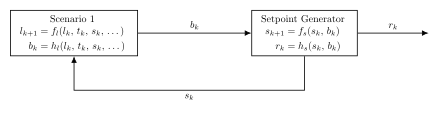
We will call the scenario defined above, somewhate unimaginatively, as “scenario_1”. After some thinking, we can cast the button logic in the scenario in an \((f,h)\)-representation.

We define a “Scenario 1” block and update our diagram as follows:
../../../_images/bk_block_to_setpoint_generator_block.svg

Hide code cell source

# ---- SCENARIO 1 BLOCK -------------------

#### ARROWS IN ####
# None

#### PARAMETERS ############
lk = {
    "button_mode": str,
    "time_since_hit_max_rk": float,
    "bk": float,
}  # scenario 1 state

tk = float  # current sim time
sk = float  # current setpoint state

scen_1_const_params = {
    "button_rate": float,
    "max_rk": float,
    "final_rk": float,
    "time_at_which_we_ramp_up": float,
    "time_at_max_rk": float,
}
#### ARROWS OUT ####
bk = int

# ---- SETPOINT BLOCK ---------------------
#### ARROWS IN ####
bk = int

#### PARAMETERS ############
sk = int
bk = int

#### ARROWS OUT ####
sk = float
rk = float

# ---- $(f,h)$-representation --------------

from typing import Dict

# This is the first $(f,h)$- representation that came to my mind, but there are plenty of others! Do whatever makes sense for you.


def scenario_1_f(lk: Dict, tk: float, sk: float, **scen_1_const_params) -> Dict:
    """
    Update scenario 1 state based on button logic.

    Implements a multi-stage button press scenario: neutral → ramp_up → hold_max → ramp_down → done.
    """
    # extract elements of state
    button_mode = lk["button_mode"]
    time_since_hit_max_rk = lk["time_since_hit_max_rk"]
    bk = lk["bk"]

    # extract constant params
    button_rate = scen_1_const_params["button_rate"]
    max_rk = scen_1_const_params["max_rk"]
    final_rk = scen_1_const_params["final_rk"]
    time_at_which_we_ramp_up = scen_1_const_params["time_at_which_we_ramp_up"]
    time_at_max_rk = scen_1_const_params["time_at_max_rk"]

    # --- Literally the same code from earlier, just copy-pasted ---
    if tk >= time_at_which_we_ramp_up and button_mode == "neutral":
        button_mode = "ramp_up"

    if button_mode == "ramp_up":
        bk = 1 * button_rate
        if sk >= max_rk:
            button_mode = "hold_max"

    if button_mode == "hold_max":
        bk = 0.0 * button_rate
        time_since_hit_max_rk += dt

        if time_since_hit_max_rk >= time_at_max_rk:
            button_mode = "ramp_down"

    if button_mode == "ramp_down":
        bk = -1 * button_rate
        if sk <= final_rk:
            button_mode = "done"
            bk = 0.0 * button_rate
    # ------

    # update state dictionary
    lk_next = lk
    lk_next["button_mode"] = button_mode
    lk_next["time_since_hit_max_rk"] = time_since_hit_max_rk
    lk_next["bk"] = bk

    return lk_next


def scenario_1_h(lk: Dict) -> float:
    """Extract button input from scenario 1 state."""
    return lk["bk"]


scenario_1_block = DynamicalSystem(f=scenario_1_f, h=scenario_1_h)

# ---- SETPOINT BLOCK ---------------------

#### ARROWS IN ####
bk = int  # button input; bk in {-1, 0, 1} (decrement, neutral, increment)

#### PARAMETERS ############
sk = int
bk = int  # Current setpoint state (cruise control setpoint in mph)

#### ARROWS OUT ####
rk = float

# ---- $(f,h)$-representation --------------

from pykal import DynamicalSystem


def setpoint_f(sk: float, bk: int) -> float:
    """Increment or decrement setpoint based on button input."""
    return sk + bk


def setpoint_h(
    sk: float,
) -> float:
    """Return the current setpoint speed."""
    rk = sk
    return rk


setpoint_block = DynamicalSystem(f=setpoint_f, h=setpoint_h)

Now we have a much cleaner simulation of our scenario above.

Note

We immediately become less formal; going forward, we only will declare and initialize variables which must be defined prior to the simulation, and we will only define them once. This is to reduce code clutter and improve readability.
Hide code cell source

# ---- SCENARIO 1 BLOCK -------------------
#### PARAMETERS ############
lk = {
    "button_mode": "neutral",
    "time_since_hit_max_rk": 0,
    "bk": 0,
}

sk = 20  # initial setpoint sk

scen_1_const_params = {
    "button_rate": 3,
    "max_rk": 80,
    "final_rk": 20,
    "time_at_which_we_ramp_up": 5,
    "time_at_max_rk": 5,
}

# ---- SETPOINT GENERATOR BLOCK -------------------

# no initialization needed

### SIMULATION VARIABLES ##############################
dt = 1
sim_time = np.arange(0, 60, dt)
rk_hist = []

### SIMULATION ###################################################

for tk in sim_time:
    lk_next, bk = scenario_1_block.step(
        params={"lk": lk, "sk": sk, "tk": tk, **scen_1_const_params}
    )
    sk_next, rk = setpoint_block.step(params={"sk": sk, "bk": bk})

    rk_hist.append(rk)

    sk = sk_next
    lk = lk_next

Hide code cell source

from matplotlib import pyplot as plt

plt.plot(sim_time, rk_hist)
plt.xlabel("time (seconds)")
plt.ylabel("rk (setpoint speed)")
plt.title("Setpoint Generator with Callback Policy")
plt.grid(True, alpha=0.3)
plt.show()
../../../_images/0a65d5254d88041d3ab2f0777285ec622342cc064099c8103bab9542dc38b671.png

To make this even more succinct, we can wrap the composition of dynamical systems above into yet another dynamical system, which we will call the “scenario_1_setpoint_generator”.
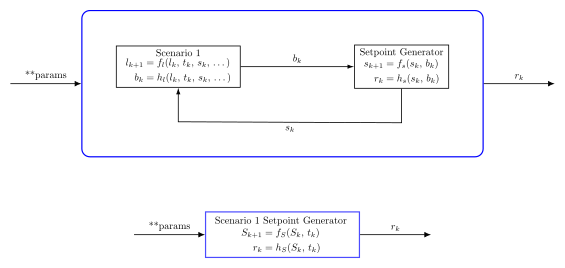
Note

The blue box represents wrapped dynamical system blocks. Internally, it contains two subsystems that communicate via signals, but externally it presents a simpler interface

Hide code cell source

# ---- SCENARIO 1 SETPOINTBLOCK -------------------

#### ARROWS IN ####
# None

#### PARAMETERS ############
Sk = {
    "lk": Dict,
    "sk": float,
    "rk": float,
}  # scenario 1 state and setpoint generator state w/output

tk = float  # current sim time

scen_1_const_params = {
    "button_rate": float,
    "max_rk": float,
    "final_rk": float,
    "time_at_which_we_ramp_up": float,
    "time_at_max_rk": float,
}

#### ARROWS OUT ####
rk = int

# ---- $(f,h)$-representation --------------
from typing import Dict


def scen_1_setpoint_block_f(Sk: Dict, tk: float, **scen_1_const_params) -> Dict:
    """
    Evolve wrapped scenario 1 setpoint system.

    Internally steps scenario_1_block and setpoint_block in series.
    """
    # extract elements of state
    lk = Sk["lk"]
    sk = Sk["sk"]

    # --- Literally just copy-pasted ---

    lk_next, bk = scenario_1_block.step(
        params={
            "lk": lk,
            "sk": sk,
            "tk": tk,
            **scen_1_const_params,
        }
    )
    sk_next, rk = setpoint_block.step(params={"sk": sk, "bk": bk})

    # ------

    # update state dictionary
    Sk["lk"] = lk_next
    Sk["sk"] = sk_next
    Sk["rk"] = rk

    Sk_next = Sk
    return Sk_next


def scen_1_setpoint_block_h(Sk: Dict) -> float:
    """Extract setpoint reference from wrapped system state."""
    return Sk["rk"]


scen_1_setpoint_block = DynamicalSystem(
    f=scen_1_setpoint_block_f, h=scen_1_setpoint_block_h
)

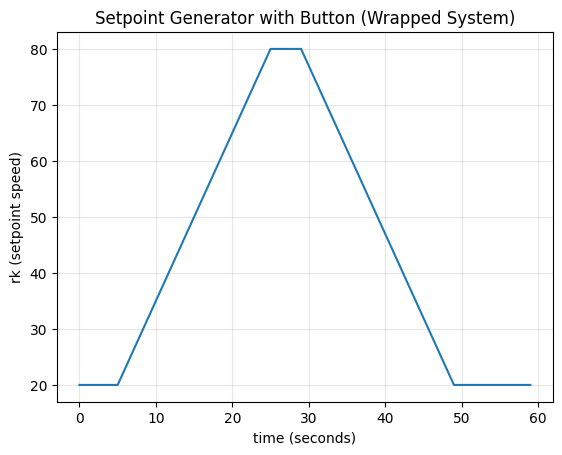
We now have a wonderfully minimal interface to play with!
Hide code cell source

# ---- SCENARIO 1 SETPOINT BLOCK -------------------

#### PARAMETERS ####

Sk = {
    "lk": {
        "button_mode": "neutral",
        "time_since_hit_max_rk": 0,
        "bk": 0,
    },
    "sk": 20,
    "rk": None,
}

scen_1_const_params = {
    "button_rate": 3,
    "max_rk": 80,
    "final_rk": 20,
    "time_at_which_we_ramp_up": 5,
    "time_at_max_rk": 5,
}

# ----------------------------------------------

### SIMULATION VARIABLES ############
rk_hist = []
dt = 1
sim_time = np.arange(0, 60, dt)

### SIMULATION ###################################################
for tk in sim_time:
    Sk_next, rk = scen_1_setpoint_block.step(
        params={"Sk": Sk, "tk": tk, **scen_1_const_params}
    )
    Sk = Sk_next

    rk_hist.append(rk)

Hide code cell source

# Plot
plt.plot(sim_time, rk_hist)
plt.xlabel("time (seconds)")
plt.ylabel("rk (setpoint speed)")
plt.title("Setpoint Generator with Button (Wrapped System)")
plt.grid(True, alpha=0.3)
plt.show()

print("✓ Wrapped system produces the same result with much simpler code!")
../../../_images/5c5472c7a9a7d7995ace03053833e4c264b7610c89adb9efd21fd0ad0ffa0fa8.png
✓ Wrapped system produces the same result with much simpler code!

Block 2: PID
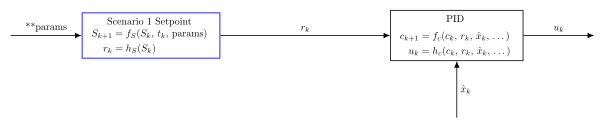
The PID controller compares the setpoint to the estimated state and computes a control command to minimize tracking error. To see the derivation of the evolution and output functions, click on the notebook link in the preceding sentence.

Hide code cell source

from typing import List

# ---- SCENARIO 1 SETPOINTBLOCK -------------------

#### ARROWS IN ####
# None

#### PARAMETERS ############
Sk = {
    "lk": Dict,
    "sk": float,
    "rk": float,
}  # scenario 1 state and setpoint generator state w/output

tk = float  # current sim time

scen_1_const_params = {
    "button_rate": float,
    "max_rk": float,
    "final_rk": float,
    "time_at_which_we_ramp_up": float,
    "time_at_max_rk": float,
}

#### ARROWS OUT ####
rk = float

# ---- $(f,h)$-representation --------------
scen_1_setpoint_block = DynamicalSystem(
    f=scen_1_setpoint_block_f, h=scen_1_setpoint_block_h
)

# ---- PID BLOCK -------------------

#### ARROWS IN ####
rk = float

#### PARAMETERS ############
ck = List  # controller state ck = [ek, Ik, ek_prev]
rk = float  # reference speed
xhatk = float  # state estimate
pid_const_params = {
    "K_P": float,  # Proportional gain
    "K_I": float,  # Integral gain (eliminates steady-state error)
    "K_D": float,  # Derivative gain (reduces overshoot)
}

#### ARROWS OUT ####
uk = float

# ---- $(f,h)$-representation --------------
from pykal.algorithm_library.controllers import pid

pid_block = DynamicalSystem(f=pid.f, h=pid.h)

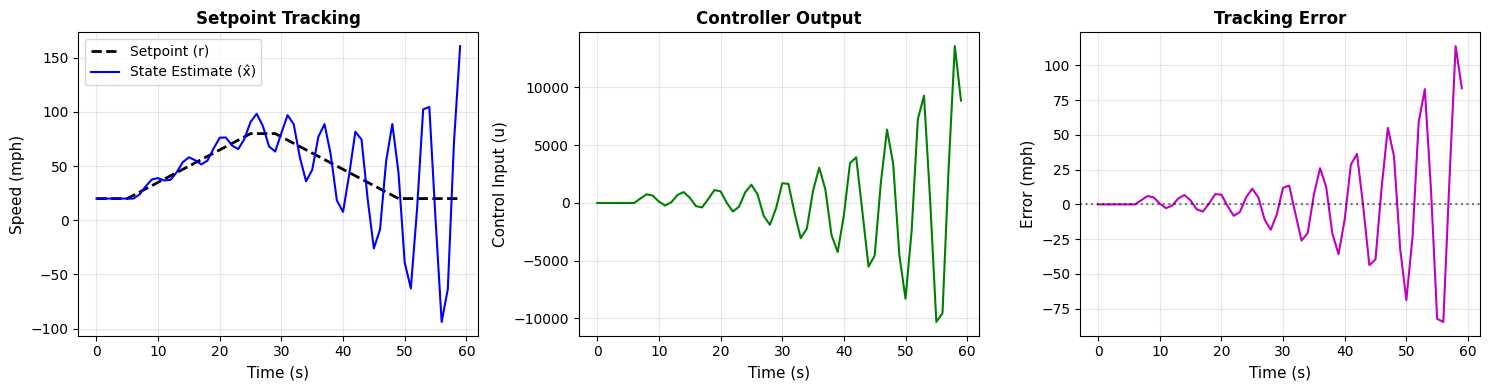
To get a feel for the PID controller, we create a simple mock system and simulate scenario_1.
Hide code cell source

# ---- SCENARIO 1 SETPOINTBLOCK -------------------
#### PARAMETERS #######
Sk = {
    "lk": {
        "button_mode": "neutral",
        "time_since_hit_max_rk": 0,
        "bk": 0,
    },
    "sk": 20,
    "rk": None,
}

scen_1_const_params = {
    "button_rate": 3,
    "max_rk": 80,
    "final_rk": 20,
    "time_at_which_we_ramp_up": 5,
    "time_at_max_rk": 5,
}

# ---- PID BLOCK -------------------

#### PARAMETERS #############

ck = (0.0, 0.0, 0.0)  # (ek, Ik, ek_prev)
pid_const_params = {"KP": 100.0, "KI": 10, "KD": 20}

xhatk = Sk["sk"]  # our initial guess is spot on

# --------------------------------------------------

### SIMULATION VARIABLES ############
dt = 1
sim_time = np.arange(0, 60, dt)
rk_hist = []
uk_hist = []
xhatk_hist = []
error_hist = []

### SIMULATION ###################################################
for tk in sim_time:
    Sk_next, rk = scen_1_setpoint_block.step(
        params={"Sk": Sk, "tk": tk, **scen_1_const_params}
    )

    ck_next, uk = pid_block.step(
        params={"ck": ck, "rk": rk, "xhatk": xhatk, **pid_const_params}
    )

    # the real plant dynamics come later
    xhatk += uk * dt * 0.01  # "some delay" via scaling factor

    rk_hist.append(rk)
    uk_hist.append(uk)
    xhatk_hist.append(xhatk)
    error_hist.append(ck[0])  # ck[0] is the current error

    Sk = Sk_next
    ck = ck_next

Hide code cell source

fig, axs = plt.subplots(1, 3, figsize=(15, 4))

# Plot 1: Setpoint and State Estimate
axs[0].plot(sim_time, rk_hist, "k--", linewidth=2, label="Setpoint (r)")
axs[0].plot(sim_time, xhatk_hist, "b-", linewidth=1.5, label="State Estimate (x̂)")
axs[0].set_xlabel("Time (s)", fontsize=11)
axs[0].set_ylabel("Speed (mph)", fontsize=11)
axs[0].set_title("Setpoint Tracking", fontsize=12, fontweight="bold")
axs[0].legend(loc="best")
axs[0].grid(True, alpha=0.3)

# Plot 2: Control Input
axs[1].plot(sim_time, uk_hist, "g-", linewidth=1.5)
axs[1].set_xlabel("Time (s)", fontsize=11)
axs[1].set_ylabel("Control Input (u)", fontsize=11)
axs[1].set_title("Controller Output", fontsize=12, fontweight="bold")
axs[1].grid(True, alpha=0.3)

# Plot 3: Tracking Error
axs[2].plot(sim_time, error_hist, "m-", linewidth=1.5)
axs[2].axhline(y=0, color="k", linestyle=":", alpha=0.5)
axs[2].set_xlabel("Time (s)", fontsize=11)
axs[2].set_ylabel("Error (mph)", fontsize=11)
axs[2].set_title("Tracking Error", fontsize=12, fontweight="bold")
axs[2].grid(True, alpha=0.3)

plt.tight_layout()
plt.show()
../../../_images/8e017812605943ba31eb8d6f4068c395cbb12c9464558c374412368ff314d80e.png

Yikes! Looks like our PID gains are incorrect. Can you fix them? And if you’re able to fix them, see what happens when you change some parameters for scen_1_setpoint_block. Is your fix robust?

Block 3: Car (Plant)

The car dynamics are modeled with position and velocity as the state, and linear drag acting on the velocity.

Hide code cell source

# ---- SCENARIO 1 SETPOINTBLOCK -------------------

#### ARROWS IN ####
# None

#### PARAMETERS ############
Sk = {
    "lk": Dict,
    "sk": float,
    "rk": float,
}  # scenario 1 state and setpoint generator state w/output

tk = float  # current sim time

scen_1_const_params = {
    "button_rate": float,
    "max_rk": float,
    "final_rk": float,
    "time_at_which_we_ramp_up": float,
    "time_at_max_rk": float,
}

#### ARROWS OUT ####
rk = float

# ---- $(f,h)$-representation --------------
scen_1_setpoint_block = DynamicalSystem(
    f=scen_1_setpoint_block_f, h=scen_1_setpoint_block_h
)

# ---- PID BLOCK -------------------

from typing import List

#### ARROWS IN ####
rk = float

#### PARAMETERS ############
ck = List  # controller state ck = [ek, Ik, ek_prev]
rk = float  # reference speed
xhatk = float  # state estimate
pid_const_params = {
    "K_P": float,  # Proportional gain
    "K_I": float,  # Integral gain (eliminates steady-state error)
    "K_D": float,  # Derivative gain (reduces overshoot)
}

#### ARROWS OUT ####
uk = float

# ---- $(f,h)$-representation --------------
from pykal.algorithm_library.controllers import pid

pid_block = DynamicalSystem(f=pid.f, h=pid.h)

# ---- PLANT BLOCK -------------------
from numpy.typing import NDArray

#### ARROWS IN ####
uk = float

#### PARAMETERS ############
pk = NDArray  #  pk.shape=(2,1), pk[0,0] = pos, pk[1,0] = vel
uk = float
car_const_params = {"m": float, "b": float, "dt": float}  # mass  # drag  # dt (duh)

#### ARROWS OUT ####
yk = float  # vel measurement


# ---- $(f,h)$-representation --------------
def plant_f(
    pk: NDArray,
    uk: float,
    m: float,
    b: float,
    dt: float,
) -> NDArray:
    """
    State evolution.

    Parameters
    ----------
    pk : (2, 1) ndarray
        State column vector [position; velocity].

    Returns
    -------
    (2, 1) ndarray
        Next state column vector.
    """

    if pk.shape != (2, 1):
        raise ValueError(f"pk must have shape (2,1); got {pk.shape}")

    p_k, v_k = pk[0, 0], pk[1, 0]

    p_next = p_k + dt * v_k
    v_next = v_k + dt * (-b / m * v_k + uk / m)

    return np.array([[p_next], [v_next]])


def plant_h(
    pk: NDArray,
) -> NDArray:
    """
    Measurement model.

    Parameters
    ----------
    pk : (2, 1) ndarray
        State column vector [position; velocity].

    Returns
    -------
    (1, 1) ndarray
        Velocity measurement.
    """

    if pk.shape != (2, 1):
        raise ValueError(f"pk must have shape (2,1); got {pk.shape}")

    v_k = pk[1, 0]

    return v_k


plant_block = DynamicalSystem(f=plant_f, h=plant_h)

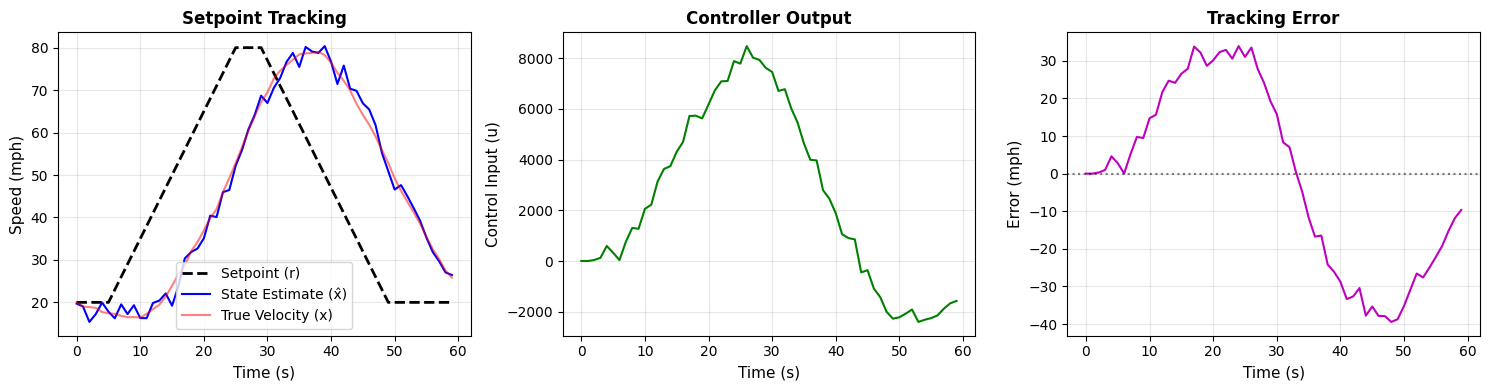
We can now update our previous PID controller simulation with the actual system we’re controlling!
Hide code cell source

import numpy as np

rng = np.random.default_rng()
# ---- SCENARIO 1 SETPOINTBLOCK -------------------
#### PARAMETERS #######
Sk = {
    "lk": {
        "button_mode": "neutral",
        "time_since_hit_max_rk": 0,
        "bk": 0,
    },
    "sk": 20,
    "rk": None,
}

scen_1_const_params = {
    "button_rate": 3,
    "max_rk": 80,
    "final_rk": 20,
    "time_at_which_we_ramp_up": 5,
    "time_at_max_rk": 5,
}

# ---- PID BLOCK -------------------

#### PARAMETERS #############

ck = (0.0, 0.0, 0.0)  # (ek, Ik, ek_prev)
pid_const_params = {"KP": 100.0, "KI": 10, "KD": 20}

xhatk = Sk["sk"]  # our initial guess is spot on

# ---------PLANT BLOCK---------------
pk = np.array([[0], [20]])
car_const_params = {"m": 1500, "b": 50, "dt": 1}

### SIMULATION VARIABLES ############
dt = 1
sim_time = np.arange(0, 60, dt)

Qk = np.array([[1e-1, 0], [0, 2e-1]])  # add process and measurement noise
Rk = np.array([[3]])

rk_hist = []
uk_hist = []
error_hist = []
xhatk_hist = []
xk_hist = []  # true velocity

### SIMULATION ###################################################
for tk in sim_time:
    Sk_next, rk = scen_1_setpoint_block.step(
        params={"Sk": Sk, "tk": tk, **scen_1_const_params}
    )

    ck_next, uk = pid_block.step(
        params={"ck": ck, "rk": rk, "xhatk": xhatk, **pid_const_params}
    )

    pk_next, yk = plant_block.step(params={"pk": pk, "uk": uk, **car_const_params})

    # Apply process noise and measurement noise
    process_noise = rng.multivariate_normal(mean=np.zeros(Qk.shape[0]), cov=Qk).reshape(
        -1, 1
    )  # (2,1) vector
    measurement_noise = rng.multivariate_normal(mean=np.zeros(Rk.shape[0]), cov=Rk)[
        0
    ]  # scalar

    pk_next = pk_next + process_noise
    yk = yk + measurement_noise

    xhatk = yk  # no smoothing; our measurement is raw

    rk_hist.append(rk)
    uk_hist.append(uk)
    xhatk_hist.append(xhatk)
    xk_hist.append(pk[1, 0])  # true velocity
    error_hist.append(ck[0])

    Sk = Sk_next
    ck = ck_next
    pk = pk_next

Hide code cell source

fig, axs = plt.subplots(1, 3, figsize=(15, 4))

# Plot 1: Setpoint and State Estimate
axs[0].plot(sim_time, rk_hist, "k--", linewidth=2, label="Setpoint (r)")
axs[0].plot(sim_time, xhatk_hist, "b-", linewidth=1.5, label="State Estimate (x̂)")
axs[0].plot(
    sim_time, xk_hist, "r-", linewidth=1.5, alpha=0.5, label="True Velocity (x)"
)
axs[0].set_xlabel("Time (s)", fontsize=11)
axs[0].set_ylabel("Speed (mph)", fontsize=11)
axs[0].set_title("Setpoint Tracking", fontsize=12, fontweight="bold")
axs[0].legend(loc="best")
axs[0].grid(True, alpha=0.3)

# Plot 2: Control Input
axs[1].plot(sim_time, uk_hist, "g-", linewidth=1.5)
axs[1].set_xlabel("Time (s)", fontsize=11)
axs[1].set_ylabel("Control Input (u)", fontsize=11)
axs[1].set_title("Controller Output", fontsize=12, fontweight="bold")
axs[1].grid(True, alpha=0.3)

# Plot 3: Tracking Error
axs[2].plot(sim_time, error_hist, "m-", linewidth=1.5)
axs[2].axhline(y=0, color="k", linestyle=":", alpha=0.5)
axs[2].set_xlabel("Time (s)", fontsize=11)
axs[2].set_ylabel("Error (mph)", fontsize=11)
axs[2].set_title("Tracking Error", fontsize=12, fontweight="bold")
axs[2].grid(True, alpha=0.3)

plt.tight_layout()
plt.show()
../../../_images/592c5d7763b5049c0acc3e7fcc5cf335c8b2d7661467c6a9ad0f1d7d028c359e.png

Alas! Can you tune the gains here? And how does changing the mass or drag of the car affect the optimal gains?

Block 4: KF (Observer)
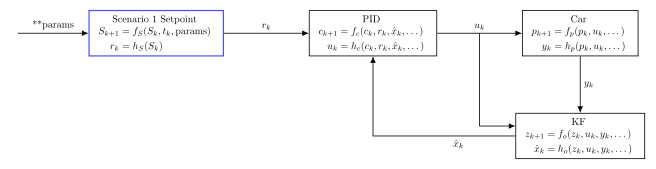
The Kalman filter estimates the car’s velocity by fusing the motion model with noisy measurements.

Hide code cell source

# ---- SCENARIO 1 SETPOINTBLOCK -------------------

#### ARROWS IN ####
# None

#### PARAMETERS ############
Sk = {
    "lk": Dict,
    "sk": float,
    "rk": float,
}  # scenario 1 state and setpoint generator state w/output

tk = float  # current sim time

scen_1_const_params = {
    "button_rate": float,
    "max_rk": float,
    "final_rk": float,
    "time_at_which_we_ramp_up": float,
    "time_at_max_rk": float,
}

#### ARROWS OUT ####
rk = float

# ---- $(f,h)$-representation --------------
scen_1_setpoint_block = DynamicalSystem(
    f=scen_1_setpoint_block_f, h=scen_1_setpoint_block_h
)

# ---- PID BLOCK -------------------

from typing import List

#### ARROWS IN ####
rk = float

#### PARAMETERS ############
ck = List  # controller state ck = [ek, Ik, ek_prev]
rk = float  # reference speed
xhatk = float  # state estimate
pid_const_params = {
    "K_P": float,  # Proportional gain
    "K_I": float,  # Integral gain (eliminates steady-state error)
    "K_D": float,  # Derivative gain (reduces overshoot)
}

#### ARROWS OUT ####
uk = float

# ---- $(f,h)$-representation --------------
from pykal.algorithm_library.controllers import pid

pid_block = DynamicalSystem(f=pid.f, h=pid.h)

# ---- PLANT BLOCK -------------------
from numpy.typing import NDArray

#### ARROWS IN ####
uk = float

#### PARAMETERS ############
pk = NDArray  #  pk.shape=(2,1), pk[0,0] = pos, pk[1,0] = vel
uk = float
car_const_params = {"m": float, "b": float, "dt": float}  # mass  # drag  # dt (duh)

#### ARROWS OUT ####
yk = float  # vel measurement


# ---- $(f,h)$-representation --------------
def plant_f(
    pk: NDArray,
    uk: float,
    m: float,
    b: float,
    dt: float,
) -> NDArray:
    """
    State evolution.

    Parameters
    ----------
    pk : (2, 1) ndarray
        State column vector [position; velocity].

    Returns
    -------
    (2, 1) ndarray
        Next state column vector.
    """

    if pk.shape != (2, 1):
        raise ValueError(f"pk must have shape (2,1); got {pk.shape}")

    p_k, v_k = pk[0, 0], pk[1, 0]

    p_next = p_k + dt * v_k
    v_next = v_k + dt * (-b / m * v_k + uk / m)

    return np.array([[p_next], [v_next]])


def plant_h(
    pk: NDArray,
) -> NDArray:
    """
    Measurement model.

    Parameters
    ----------
    pk : (2, 1) ndarray
        State column vector [position; velocity].

    Returns
    -------
    (1, 1) ndarray
        Velocity measurement.
    """

    if pk.shape != (2, 1):
        raise ValueError(f"pk must have shape (2,1); got {pk.shape}")

    v_k = pk[1, 0]

    return v_k


plant_block = DynamicalSystem(f=plant_f, h=plant_h)

# ---- KF BLOCK -------------------
from numpy.typing import NDArray
from typing import Callable

#### ARROWS IN ####
uk = float
yk = NDArray  # (since kf expects an array and yk is a float from plant_block, we will recast yk when we call the kf block)

#### PARAMETERS ############
zk = List  #  zk[0]=pk, zk[1] = Pk (covariance matrix)

kf_const_params = {
    "f": Callable,  # plant evolution function
    "h": Callable,  # plant output function
    "Fk": NDArray,  # plant evolution function Jacobian
    "Hk": NDArray,  # plant output function Jacobian
    "Qk": NDArray,  # process noise covariance matrix
    "Rk": NDArray,  # measurement noise covariance matrix
}

f_h_params = Dict


#### ARROWS OUT ####
xhatk = NDArray  # vel prediction measurement


# ---- $(f,h)$-representation --------------

from pykal.algorithm_library.estimators import kf

kf_block = DynamicalSystem(f=kf.f, h=kf.h)

We can now simulate the full system.

Hide code cell source

import numpy as np

rng = np.random.default_rng()
# ---- SCENARIO 1 SETPOINTBLOCK -------------------
#### PARAMETERS #######
Sk = {
    "lk": {
        "button_mode": "neutral",
        "time_since_hit_max_rk": 0,
        "bk": 0,
    },
    "sk": 20,
    "rk": None,
}

scen_1_const_params = {
    "button_rate": 3,
    "max_rk": 80,
    "final_rk": 20,
    "time_at_which_we_ramp_up": 5,
    "time_at_max_rk": 5,
}

# ---- PID BLOCK -------------------

#### PARAMETERS #############

ck = (0.0, 0.0, 0.0)  # (ek, Ik, ek_prev)
pid_const_params = {"KP": 100.0, "KI": 10, "KD": 20}

xhatk = Sk["sk"]  # our initial guess is spot on

# ---------PLANT BLOCK---------------
#### PARAMETERS #############
pk = np.array([[0], [20]])
car_const_params = {"m": 1500, "b": 50, "dt": 1}

# ---------KF BLOCK---------------
#### PARAMETERS #############
zk = [
    pk,  # [xhatk,Pk] - full state estimate [position, velocity]
    np.array([[0.5, 0.0], [0.0, 1.0]]),
]


def plant_F(**car_const_params) -> np.ndarray:
    """
    Compute Jacobian of plant_f with respect to state x = [x_k, v_k].
    """
    m = car_const_params["m"]
    b = car_const_params["b"]
    dt = car_const_params["dt"]
    return np.array(
        [
            [1.0, dt],
            [0.0, 1.0 - (b / m) * dt],
        ]
    )


def plant_H() -> np.ndarray:
    """
    Compute Jacobian of plant_h with respect to state x = [x_k, v_k].
    """
    return np.array([[0.0, 1.0]])


Fk = plant_F(**car_const_params)
Hk = plant_H()
Qk = np.array([[1e-1, 0], [0, 2e-1]])
Rk = np.array([[3]])

kf_const_params = {
    "f": plant_block.f,
    "h": plant_block.h,
    "Fk": Fk,
    "Hk": Hk,
}
# ----------------------------------------

### SIMULATION VARIABLES ############
dt = 1
sim_time = np.arange(0, 60, dt)

Qk = np.array([[1e-1, 0], [0, 2e-1]])  # add process and measurement noise
Rk = np.array([[3]])

rk_hist = []
uk_hist = []
error_hist = []
xhatk_hist = []
xk_hist = []
yk_hist = []

### SIMULATION ###################################################
for tk in sim_time:
    Sk_next, rk = scen_1_setpoint_block.step(
        params={"Sk": Sk, "tk": tk, **scen_1_const_params}
    )

    ck_next, uk = pid_block.step(
        params={"ck": ck, "rk": rk, "xhatk": xhatk, **pid_const_params}
    )

    pk_next, yk = plant_block.step(params={"pk": pk, "uk": uk, **car_const_params})

    # Apply process noise and measurement noise
    process_noise = rng.multivariate_normal(mean=np.zeros(Qk.shape[0]), cov=Qk).reshape(
        -1, 1
    )  # (2,1) vector
    measurement_noise = rng.multivariate_normal(mean=np.zeros(Rk.shape[0]), cov=Rk)[
        0
    ]  # scalar

    pk_next = pk_next + process_noise
    yk = yk + measurement_noise

    zk_next, phatk = kf_block.step(
        params={
            "zk": zk,
            "uk": uk,
            "yk": np.array([[yk]]),
            "Qk": Qk,
            "Rk": Rk,
            **kf_const_params,
            "f_h_params": {
                "pk": pk,
                "uk": uk,
                **car_const_params,
            },
        }
    )

    xhatk = phatk[1, 0]

    rk_hist.append(rk)
    uk_hist.append(uk)
    xhatk_hist.append(xhatk)
    xk_hist.append(pk[1, 0])  # true velocity
    error_hist.append(ck[0])
    yk_hist.append(yk)

    Sk = Sk_next
    ck = ck_next
    pk = pk_next
    zk = zk_next

Hide code cell source

fig, axs = plt.subplots(1, 3, figsize=(15, 4))

# Plot 1: Setpoint and State Estimate
axs[0].plot(sim_time, rk_hist, "k--", linewidth=2, label="Setpoint (r)")
axs[0].plot(sim_time, xhatk_hist, "b-", linewidth=1.5, label="State Estimate (x̂)")
axs[0].plot(
    sim_time, xk_hist, "r-", linewidth=1.5, alpha=0.5, label="True Velocity (x)"
)
axs[0].scatter(
    sim_time[::10], yk_hist[::10], c="gray", s=10, alpha=0.3, label="Measurements (y)"
)
axs[0].set_xlabel("Time (s)", fontsize=11)
axs[0].set_ylabel("Speed (mph)", fontsize=11)
axs[0].set_title("Velocity Tracking", fontsize=12, fontweight="bold")
axs[0].legend(loc="best")
axs[0].grid(True, alpha=0.3)

# Plot 2: Control Input
axs[1].plot(sim_time, uk_hist, "g-", linewidth=1.5)
axs[1].set_xlabel("Time (s)", fontsize=11)
axs[1].set_ylabel("Control Input (u)", fontsize=11)
axs[1].set_title("Controller Output", fontsize=12, fontweight="bold")
axs[1].grid(True, alpha=0.3)

# Plot 3: Tracking Error
axs[2].plot(sim_time, error_hist, "m-", linewidth=1.5)
axs[2].axhline(y=0, color="k", linestyle=":", alpha=0.5)
axs[2].set_xlabel("Time (s)", fontsize=11)
axs[2].set_ylabel("Error (mph)", fontsize=11)
axs[2].set_title("Tracking Error", fontsize=12, fontweight="bold")
axs[2].grid(True, alpha=0.3)

plt.tight_layout()
plt.show()
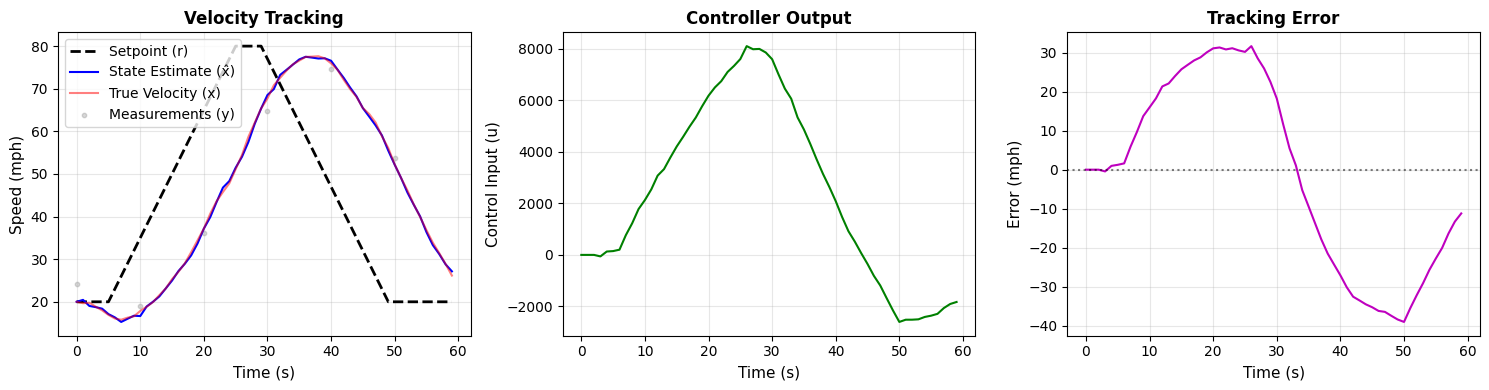
../../../_images/155375f62acf6d01e67d30d49b08aab7f2a62bb6115473860043b3ae1859e81d.png

Wrapping the Complete System

Just as we wrapped the button logic into a DynamicalSystem earlier, we can wrap the entire cruise control system into a single DynamicalSystem object. All system parameters can be configured at initialization, and the simulation loop becomes trivial.
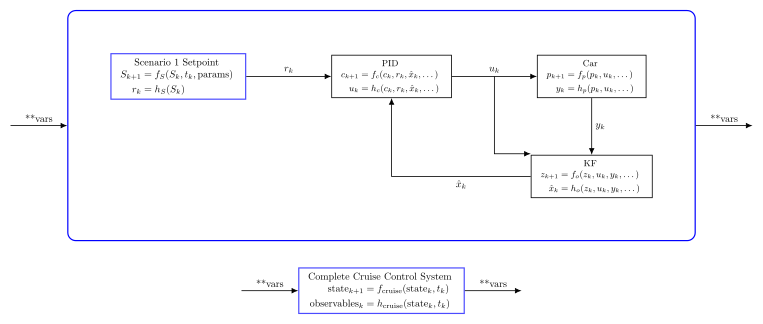
The diagram above shows the complete cruise control system in two views. The top view shows all five subsystems (Button, Setpoint, PID, Plant, and Observer) wrapped inside a blue box, with all internal signals visible. The bottom view shows the same system from the outside—a single DynamicalSystem block with a clean interface that accepts parameters and returns the desired variables.

Hide code cell source

# --------- CRUISE CONTROL BLOCK---------------
#### ARROWS IN ####
# None

#### PARAMETERS #############
Ck = {
    "Sk": Dict,
    "zk": List,
    "pk": NDArray,
    "ck": List,
    "xhatk": float,
    "rk": float,
    "uk": float,
    "xk": float,
    "err": float,
    "yk": float,
}  # whole system state
tk = float  # current time
scen_1_const_params = Dict
car_const_params = Dict
kf_const_params = Dict
pid_const_params = Dict
Qk = NDArray
Rk = NDArray

#### ARROWS OUT ####
xhatk = float

# ---- $(f,h)$-representation --------------


def cruise_control_f(
    Ck: Dict,
    tk: float,
    Qk: NDArray,
    Rk: NDArray,
    scen_1_const_params: Dict,
    pid_const_params: Dict,
    car_const_params: Dict,
    kf_const_params: Dict,
) -> Dict:
    Sk = Ck["Sk"]
    zk = Ck["zk"]
    pk = Ck["pk"]
    ck = Ck["ck"]
    xhatk = Ck["xhatk"]

    Sk_next, rk = scen_1_setpoint_block.step(
        params={"Sk": Sk, "tk": tk, **scen_1_const_params}
    )

    ck_next, uk = pid_block.step(
        params={"ck": ck, "rk": rk, "xhatk": xhatk, **pid_const_params}
    )

    pk_next, yk = plant_block.step(params={"pk": pk, "uk": uk, **car_const_params})

    # Apply process noise and measurement noise
    process_noise = rng.multivariate_normal(mean=np.zeros(Qk.shape[0]), cov=Qk).reshape(
        -1, 1
    )  # (2,1) vector
    measurement_noise = rng.multivariate_normal(mean=np.zeros(Rk.shape[0]), cov=Rk)[
        0
    ]  # scalar

    pk_next = pk_next + process_noise
    yk = yk + measurement_noise

    zk_next, phatk = kf_block.step(
        params={
            "zk": zk,
            "uk": uk,
            "yk": np.array([[yk]]),
            "Qk": Qk,
            "Rk": Rk,
            **kf_const_params,
            "f_h_params": {
                "pk": pk,
                "uk": uk,
                **car_const_params,
            },
        }
    )

    xhatk = phatk[1, 0]

    Ck_next = Ck
    Ck_next["Sk"] = Sk_next
    Ck_next["zk"] = zk_next
    Ck_next["pk"] = pk_next
    Ck_next["ck"] = ck_next
    Ck_next["xhatk"] = xhatk
    Ck_next["rk"] = rk
    Ck_next["uk"] = uk
    Ck_next["xk"] = pk[1, 0]
    Ck_next["err"] = ck[0]
    Ck_next["yk"] = yk

    return Ck_next


def cruise_control_h(Ck: Dict) -> Dict:
    output_dict = {
        "xhatk": Ck["xhatk"],
        "rk": Ck["rk"],
        "uk": Ck["uk"],
        "xk": Ck["xk"],
        "err": Ck["err"],
        "yk": Ck["yk"],
    }
    return output_dict


cruise_control_block = DynamicalSystem(f=cruise_control_f, h=cruise_control_h)

With the state as we’ve defined it, initialization might seem tricky. Here we introduce a neat trick to make initialization trivial: we can run the previous simulation once and set the appropriate values in \(C_k\)!

Hide code cell source

import numpy as np

rng = np.random.default_rng()
# ---- SCENARIO 1 SETPOINTBLOCK -------------------
#### PARAMETERS #######
Sk = {
    "lk": {
        "button_mode": "neutral",
        "time_since_hit_max_rk": 0,
        "bk": 0,
    },
    "sk": 20,
    "rk": None,
}

scen_1_const_params = {
    "button_rate": 3,
    "max_rk": 80,
    "final_rk": 20,
    "time_at_which_we_ramp_up": 5,
    "time_at_max_rk": 5,
}

# ---- PID BLOCK -------------------

#### PARAMETERS #############

ck = (0.0, 0.0, 0.0)  # (ek, Ik, ek_prev)
pid_const_params = {"KP": 100.0, "KI": 10, "KD": 20}

xhatk = Sk["sk"]  # our initial guess is spot on

# ---------PLANT BLOCK---------------
#### PARAMETERS #############
pk = np.array([[0], [20]])
car_const_params = {"m": 1500, "b": 50, "dt": 1}

# ---------KF BLOCK---------------
#### PARAMETERS #############
zk = [
    pk,  # [xhatk,Pk] - full state estimate [position, velocity]
    np.array([[0.5, 0.0], [0.0, 1.0]]),
]


def plant_F(**car_const_params) -> np.ndarray:
    """
    Compute Jacobian of plant_f with respect to state x = [x_k, v_k].
    """
    m = car_const_params["m"]
    b = car_const_params["b"]
    dt = car_const_params["dt"]
    return np.array(
        [
            [1.0, dt],
            [0.0, 1.0 - (b / m) * dt],
        ]
    )


def plant_H() -> np.ndarray:
    """
    Compute Jacobian of plant_h with respect to state x = [x_k, v_k].
    """
    return np.array([[0.0, 1.0]])


Fk = plant_F(**car_const_params)
Hk = plant_H()
Qk = np.array([[1e-1, 0], [0, 2e-1]])
Rk = np.array([[3]])

kf_const_params = {
    "f": plant_block.f,
    "h": plant_block.h,
    "Fk": Fk,
    "Hk": Hk,
}
### SIMULATION VARIABLES ############
dt = 1
sim_time = np.arange(0, 1, dt)  # just tk = 0

for tk in sim_time:
    Sk_next, rk = scen_1_setpoint_block.step(
        params={"Sk": Sk, "tk": tk, **scen_1_const_params}
    )

    ck_next, uk = pid_block.step(
        params={"ck": ck, "rk": rk, "xhatk": xhatk, **pid_const_params}
    )

    pk_next, yk = plant_block.step(params={"pk": pk, "uk": uk, **car_const_params})

    # Apply process noise and measurement noise
    process_noise = rng.multivariate_normal(mean=np.zeros(Qk.shape[0]), cov=Qk).reshape(
        -1, 1
    )  # (2,1) vector
    measurement_noise = rng.multivariate_normal(mean=np.zeros(Rk.shape[0]), cov=Rk)[
        0
    ]  # scalar

    pk_next = pk_next + process_noise
    yk = yk + measurement_noise

    zk_next, phatk = kf_block.step(
        params={
            "zk": zk,
            "uk": uk,
            "yk": np.array([[yk]]),
            "Qk": Qk,
            "Rk": Rk,
            **kf_const_params,
            "f_h_params": {
                "pk": pk,
                "uk": uk,
                **car_const_params,
            },
        }
    )

    xhatk = phatk[1, 0]

    # initialize Ck
    Ck = {
        "Sk": Sk,
        "zk": zk,
        "pk": pk,
        "ck": ck,
        "xhatk": xhatk,
        "rk": rk,
        "uk": uk,
        "xk": pk[1, 0],
        "err": ck[0],
        "yk": yk,
    }

# %%[markdown]
# Now we can simulate the entire system within a single dynamical system.
import numpy as np

rng = np.random.default_rng()

### SIMULATION VARIABLES ############
dt = 1
sim_time = np.arange(0, 60, dt)

Qk = np.array([[1e-1, 0], [0, 2e-1]])  # add process and measurement noise
Rk = np.array([[3]])

rk_hist = []
uk_hist = []
error_hist = []
xhatk_hist = []
xk_hist = []
yk_hist = []

### SIMULATION ###################################################
for tk in sim_time:
    Ck_next, output_dict = cruise_control_block.step(
        params={
            "Ck": Ck,
            "tk": tk,
            "Qk": Qk,
            "Rk": Rk,
            "scen_1_const_params": scen_1_const_params,
            "pid_const_params": pid_const_params,
            "car_const_params": car_const_params,
            "kf_const_params": kf_const_params,
        }
    )

    rk_hist.append(output_dict["rk"])
    uk_hist.append(output_dict["uk"])
    xhatk_hist.append(output_dict["xhatk"])
    xk_hist.append(output_dict["xk"])  # true velocity
    error_hist.append(output_dict["err"])
    yk_hist.append(output_dict["yk"])
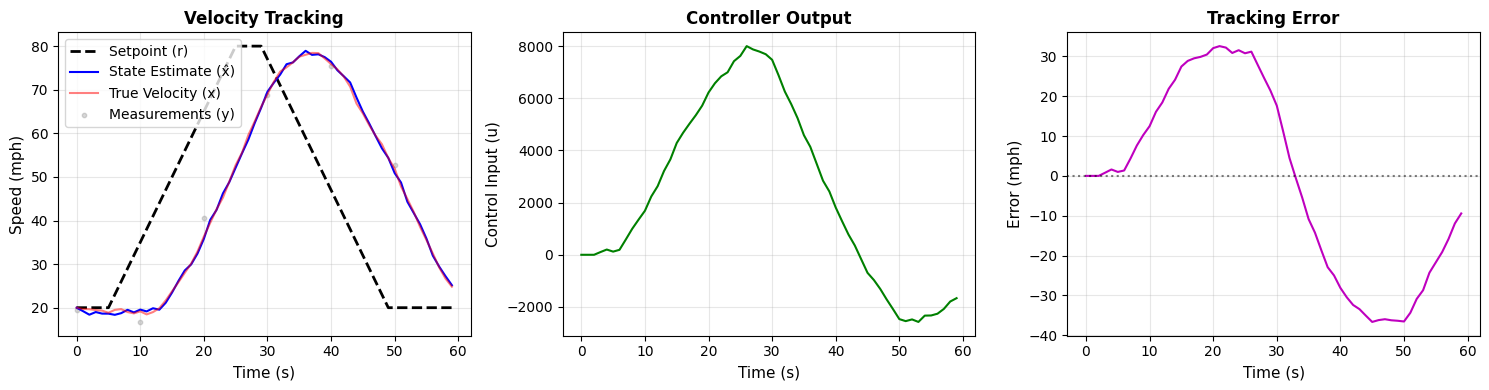
Hide code cell source

fig, axs = plt.subplots(1, 3, figsize=(15, 4))

# Plot 1: Setpoint and State Estimate
axs[0].plot(sim_time, rk_hist, "k--", linewidth=2, label="Setpoint (r)")
axs[0].plot(sim_time, xhatk_hist, "b-", linewidth=1.5, label="State Estimate (x̂)")
axs[0].plot(
    sim_time, xk_hist, "r-", linewidth=1.5, alpha=0.5, label="True Velocity (x)"
)
axs[0].scatter(
    sim_time[::10], yk_hist[::10], c="gray", s=10, alpha=0.3, label="Measurements (y)"
)
axs[0].set_xlabel("Time (s)", fontsize=11)
axs[0].set_ylabel("Speed (mph)", fontsize=11)
axs[0].set_title("Velocity Tracking", fontsize=12, fontweight="bold")
axs[0].legend(loc="best")
axs[0].grid(True, alpha=0.3)

# Plot 2: Control Input
axs[1].plot(sim_time, uk_hist, "g-", linewidth=1.5)
axs[1].set_xlabel("Time (s)", fontsize=11)
axs[1].set_ylabel("Control Input (u)", fontsize=11)
axs[1].set_title("Controller Output", fontsize=12, fontweight="bold")
axs[1].grid(True, alpha=0.3)

# Plot 3: Tracking Error
axs[2].plot(sim_time, error_hist, "m-", linewidth=1.5)
axs[2].axhline(y=0, color="k", linestyle=":", alpha=0.5)
axs[2].set_xlabel("Time (s)", fontsize=11)
axs[2].set_ylabel("Error (mph)", fontsize=11)
axs[2].set_title("Tracking Error", fontsize=12, fontweight="bold")
axs[2].grid(True, alpha=0.3)

plt.tight_layout()
plt.show()
../../../_images/9c373722882d6c2265ef11832fe25e790925e7fac3826f4ecff1ded30b37c558.png

Experimentation

Controller tuning:

  • Adjust PID gains (KP, KI, KD) to reduce overshoot

  • What happens if you increase KP too much? (oscillations)

  • What happens if KD is too small? (slow settling)

  • Find optimal gains for minimal overshoot and settling time

Setpoint policy:

  • Change button policy parameters (button_rate, hold_seconds_at_max)

  • Try different target speeds and ramp rates

  • Design a smooth sinusoidal setpoint trajectory

Plant variations:

  • Modify physical parameters (m, b) to simulate different vehicles

    • Heavy truck: m=5000 kg, b=100 kg/s

    • Sports car: m=1000 kg, b=30 kg/s

  • Add measurement noise to make the problem more realistic

  • Tune Kalman filter covariances (Q, R) for different noise scenarios

Challenge: Can you design PID gains that work well for both a heavy truck and a sports car?

← Control Systems as Dynamical Systems