← Dynamical Systems as ROS Nodes
TurtleBot State Estimation: From Python to ROS2
In the TurtleBot State Estimation tutorial, we designed a complete navigation system in Python using DynamicalSystem components. Now we’ll deploy this exact system as ROS2 nodes.
Key Insight: The dynamical system architecture maps directly to ROS!
Each DynamicalSystem becomes a ROS node, and parameter dictionary connections become ROS topics. This 1:1 correspondence preserves our theoretical design while enabling distributed deployment.
Conceptual Foundation: From Dynamical Systems to ROS Nodes
Recall from the TurtleBot State Estimation tutorial that we represented our navigation system as a composition of dynamical systems:
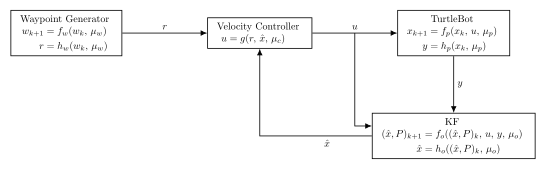
Each block is a DynamicalSystem with state evolution (f) and observation (h) functions. Data flows through a shared parameter dictionary.
The ROS Mapping
There is a direct correspondence between this dynamical system representation and a ROS node architecture:
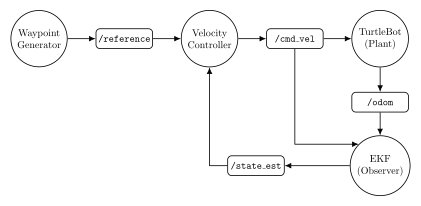
The correspondence:
Each dynamical system block becomes a ROS node
Each data connection becomes a ROS topic
The parameter dictionary is replaced by message passing
Each step() method becomes a callback function
Mathematically: There is a functor from the category of discrete-time dynamical systems (objects = blocks, morphisms = data flows) to the category of ROS nodes (objects = nodes, morphisms = topics).
Adding Teleoperation
In the Python simulation, we couldn’t interactively control the robot during execution because Jupyter kernels lack elegant real-time input handling. However, ROS middleware naturally supports this through teleop nodes!
Teleoperation provides direct velocity control, bypassing the high-level navigation pipeline entirely:
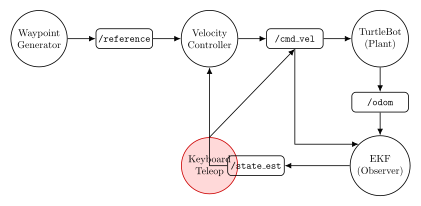
Key Architectural Difference:
Autonomous Navigation: Waypoint Generator → Velocity Controller →
/cmd_vel→ PlantTeleoperation: Keyboard Teleop →
/cmd_vel→ Plant
The Keyboard Teleop node publishes velocity commands directly to /cmd_vel, completely bypassing both the waypoint generator and position controller. The observer (Kalman filter) continues running to provide state estimates for monitoring and visualization.
This design pattern is common in robotics: teleoperation provides low-level control for manual operation, while autonomous mode uses the full planning and control pipeline.
Note
This tutorial implements the basic ROS node architecture (without teleop). The teleop version will be demonstrated in a later tutorial.
Individual Node Blocks
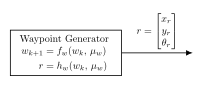
Each ROS node wraps a dynamical system block. Here are the individual components:
Waypoint Generator
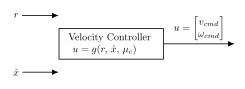
Velocity Controller
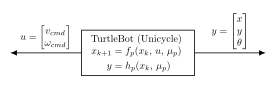
TurtleBot Plant
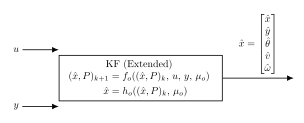
EKF Observer
In the following sections, we’ll implement each of these blocks as ROSNode instances, demonstrating how theoretical design maps directly to ROS deployment.
Architecture Comparison: Python Simulation vs ROS Nodes
Python Simulation (theory notebook):
# Direct function calls, shared parameter dictionary
for tk in time_steps:
    rk = waypoint_generator(...)  # Returns reference
    xhat = observer.h(xhat_P)      # Extract estimate
    uk = controller(xhat, rk, ...) # Generate command
    xk, yk = plant.step(...)       # Update plant
    xhat_P = observer.step(...)    # Update observer
ROS2 Nodes (this notebook):
waypoint_generator_node → /reference (PoseStamped)
                               ↓
velocity_controller_node → /cmd_vel (Twist)
                               ↓
turtlebot_simulator_node → /odom (Odometry)
                               ↓
kalman_filter_node → /estimate (Odometry)
        ↓
   (feedback via /estimate topic)
Note
The ROS graph is the block diagram! Each function becomes a node, each data flow becomes a topic.
ROS2 System Architecture
Our system consists of four ROS nodes:

Node 1: Waypoint Generator
Publishes:
/reference(PoseStamped)Function: Generates reference poses for tracking
Node 2: Velocity Controller
Subscribes:
/reference,/estimatePublishes:
/cmd_vel(Twist)Function: Proportional control to track reference
Node 3: TurtleBot Simulator
Subscribes:
/cmd_velPublishes:
/odom(noisy),/true_state(clean)Function: Simulates robot dynamics and sensors
Node 4: Kalman Filter Observer
Subscribes:
/odom,/cmd_velPublishes:
/estimate(Odometry)Function: Fuses measurements and predictions
Setup: Imports and Core Functions
import numpy as np
import matplotlib.pyplot as plt
from pykal import DynamicalSystem
from pykal.ros.ros_node import ROSNode
from pykal.algorithm_library.estimators.kf import KF
from pykal.data_change import corrupt

# ROS message types
from geometry_msgs.msg import Twist, PoseStamped
from nav_msgs.msg import Odometry
import rclpy
import time

print("✓ Imports successful!")
Core TurtleBot Functions (from Theory Notebook)
We reuse the exact same dynamics and Jacobian functions from the theory notebook:
# ============================================================================
# TurtleBot Dynamics
# ============================================================================


def turtlebot_f(xk: np.ndarray, uk: np.ndarray, dt: float) -> np.ndarray:
    """Unicycle kinematics: [x, y, theta, v, omega]."""
    x, y, theta, v, omega = xk.flatten()
    v_cmd, omega_cmd = uk.flatten()

    x_new = x + v * np.cos(theta) * dt
    y_new = y + v * np.sin(theta) * dt
    theta_new = np.arctan2(np.sin(theta + omega * dt), np.cos(theta + omega * dt))

    return np.array([[x_new], [y_new], [theta_new], [v_cmd], [omega_cmd]])


def turtlebot_h(xk: np.ndarray) -> np.ndarray:
    """Measurement: [x, y, theta] from odometry."""
    return xk[:3, :]


# ============================================================================
# EKF Jacobians
# ============================================================================


def compute_F_jacobian(xhat: np.ndarray, dt: float) -> np.ndarray:
    """Jacobian of dynamics."""
    _, _, theta, v, _ = xhat.flatten()
    return np.array(
        [
            [1, 0, -v * np.sin(theta) * dt, np.cos(theta) * dt, 0],
            [0, 1, v * np.cos(theta) * dt, np.sin(theta) * dt, 0],
            [0, 0, 1, 0, dt],
            [0, 0, 0, 1, 0],
            [0, 0, 0, 0, 1],
        ]
    )


def compute_H_jacobian() -> np.ndarray:
    """Jacobian of measurement."""
    return np.array([[1, 0, 0, 0, 0], [0, 1, 0, 0, 0], [0, 0, 1, 0, 0]])


# ============================================================================
# Noise Covariances
# ============================================================================

Q_turtlebot = np.diag([0.01, 0.01, 0.02, 0.1, 0.1])  # Process noise
R_turtlebot = np.diag([0.05, 0.05, 0.1])  # Measurement noise

print("Core TurtleBot functions defined!")
---------------------------------------------------------------------------
NameError                                 Traceback (most recent call last)
Cell In[1], line 6
      1 # ============================================================================
      2 # TurtleBot Dynamics
      3 # ============================================================================
----> 6 def turtlebot_f(xk: np.ndarray, uk: np.ndarray, dt: float) -> np.ndarray:
      7     """Unicycle kinematics: [x, y, theta, v, omega]."""
      8     x, y, theta, v, omega = xk.flatten()

NameError: name 'np' is not defined
Node 1: Waypoint Generator
ROS Wrapper Pattern: We wrap our waypoint logic in a ROSNode that publishes /reference.
Message Format: PoseStamped = (8,) array [t, px, py, pz, qx, qy, qz, qw]
Key Changes from Python:
Python: Returns NumPy array directly
ROS: Publishes to
/referencetopicMessage conversion handled automatically by
ROSNode
def create_waypoint_generator_node(waypoints, switch_time=15.0, rate_hz=10.0):
    """
    Create ROS node that publishes waypoints.

    Parameters
    ----------
    waypoints : list of tuples
        Each tuple is (x, y, theta)
    switch_time : float
        Time to spend at each waypoint
    rate_hz : float
        Publishing rate

    Returns
    -------
    ROSNode
        Configured waypoint generator node
    """
    # State: current waypoint index and time elapsed
    current_idx = 0
    time_at_waypoint = 0.0
    last_tk = 0.0

    def waypoint_callback(tk):
        nonlocal current_idx, time_at_waypoint, last_tk

        # Compute elapsed time
        dt = tk - last_tk if last_tk > 0 else 0.0
        last_tk = tk
        time_at_waypoint += dt

        # Switch waypoint if needed
        if time_at_waypoint >= switch_time:
            current_idx = (current_idx + 1) % len(waypoints)
            time_at_waypoint = 0.0

        # Get current waypoint
        x_r, y_r, theta_r = waypoints[current_idx]

        # Convert theta to quaternion (2D: only yaw rotation)
        qx, qy = 0.0, 0.0
        qz = np.sin(theta_r / 2.0)
        qw = np.cos(theta_r / 2.0)

        # Pack as PoseStamped: [t, px, py, pz, qx, qy, qz, qw]
        reference = np.array([tk, x_r, y_r, 0.0, qx, qy, qz, qw])

        return {"reference": reference}

    # Create ROS node
    node = ROSNode(
        node_name="waypoint_generator",
        callback=waypoint_callback,
        subscribes_to=[],  # No subscriptions
        publishes_to=[
            ("reference", PoseStamped, "/reference"),
        ],
        rate_hz=rate_hz)

    return node


# Create waypoint generator
square_waypoints = [
    (2.0, 0.0, 0.0),  # Right
    (2.0, 2.0, np.pi / 2),  # Up
    (0.0, 2.0, np.pi),  # Left
    (0.0, 0.0, -np.pi / 2),  # Down
]

waypoint_node = create_waypoint_generator_node(
    waypoints=square_waypoints, switch_time=15.0, rate_hz=10.0
)

print("Waypoint generator node created!")
print(f"  Publishes: /reference (PoseStamped)")
print(f"  Waypoints: {len(square_waypoints)} points in square pattern")
print(f"  Switch time: 15.0 seconds")
Node 2: Velocity Controller
ROS Wrapper Pattern: Subscribes to /reference and /estimate, publishes /cmd_vel.
Controller Law:
Key Changes from Python:
Python: Direct function call with parameters
ROS: Callback receives messages as kwargs
Automatic message → NumPy conversion
def create_velocity_controller_node(Kv=0.5, Komega=1.5, rate_hz=50.0):
    """
    Create ROS node for proportional velocity controller.

    Parameters
    ----------
    Kv : float
        Linear velocity gain
    Komega : float
        Angular velocity gain
    rate_hz : float
        Control loop rate

    Returns
    -------
    ROSNode
        Configured controller node
    """

    def controller_callback(tk, reference, estimate):
        """
        Compute velocity command.

        Args:
            tk (float): Current time
            reference (np.ndarray): (8) PoseStamped [t, px, py, pz, qx, qy, qz, qw]
            estimate (np.ndarray): (13) Odometry [px, py, pz, qx, qy, qz, qw, vx, vy, vz, wx, wy, wz]

        Returns:
            dict: {'cmd_vel': (6) Twist array}
        """
        # Extract reference position and heading
        x_r, y_r = reference[1], reference[2]  # Skip timestamp
        qz_r, qw_r = reference[6], reference[7]
        theta_r = np.arctan2(2.0 * qw_r * qz_r, 1.0 - 2.0 * qz_r**2)

        # Extract current position and heading from estimate
        x, y = estimate[0], estimate[1]
        qz, qw = estimate[5], estimate[6]
        theta = np.arctan2(2.0 * qw * qz, 1.0 - 2.0 * qz**2)

        # Compute errors
        dx = x_r - x
        dy = y_r - y
        distance = np.sqrt(dx**2 + dy**2)

        heading_error = theta_r - theta
        heading_error = np.arctan2(np.sin(heading_error), np.cos(heading_error))

        # Proportional control
        v_cmd = Kv * distance
        omega_cmd = Komega * heading_error

        # Saturate (TurtleBot limits)
        v_cmd = np.clip(v_cmd, -0.22, 0.22)
        omega_cmd = np.clip(omega_cmd, -2.84, 2.84)

        # Pack as Twist: [vx, vy, vz, wx, wy, wz]
        cmd_vel = np.array([v_cmd, 0.0, 0.0, 0.0, 0.0, omega_cmd])

        return {"cmd_vel": cmd_vel}

    # Create ROS node
    node = ROSNode(
        node_name="velocity_controller",
        callback=controller_callback,
        subscribes_to=[
            ("/reference", PoseStamped, "reference"),
            ("/estimate", Odometry, "estimate"),
        ],
        publishes_to=[
            ("cmd_vel", Twist, "/cmd_vel"),
        ],
        rate_hz=rate_hz,
        required_topics={"reference", "estimate"},  # Both required for control
    )

    return node


# Create controller node
controller_node = create_velocity_controller_node(Kv=0.5, Komega=1.5, rate_hz=50.0)

print("Velocity controller node created!")
print(f"  Subscribes: /reference, /estimate")
print(f"  Publishes: /cmd_vel (Twist)")
print(f"  Gains: Kv={0.5}, Komega={1.5}")
print(f"  Rate: 50 Hz")
Node 3: TurtleBot Simulator (Plant)
ROS Wrapper Pattern: Subscribes to /cmd_vel, publishes /odom and /true_state.
Dynamics: Same unicycle model from theory notebook
Measurement Noise: Adds realistic odometry noise + occasional spikes
Note
We publish both /odom (noisy, like a real robot) and /true_state (clean, for visualization).
def create_turtlebot_simulator_node(dt=0.1, rate_hz=10.0, R=None):
    """
    Create ROS node that simulates TurtleBot dynamics.

    Parameters
    ----------
    dt : float
        Integration timestep
    rate_hz : float
        Simulation rate
    R : np.ndarray
        Measurement noise covariance (3x3)

    Returns
    -------
    ROSNode
        Configured simulator node
    """
    if R is None:
        R = np.diag([0.05, 0.05, 0.1])  # Default odometry noise

    # Internal state: [x, y, theta, v, omega]
    xk = np.array([[0.0], [0.0], [0.0], [0.0], [0.0]])

    def simulator_callback(tk, cmd_vel):
        """
        Simulate one timestep of TurtleBot dynamics.

        Args:
            tk (float): Current time
            cmd_vel (np.ndarray): (6) Twist [vx, vy, vz, wx, wy, wz]

        Returns:
            dict: {'odom': noisy Odometry, 'true_state': clean Odometry}
        """
        nonlocal xk

        # Extract commands (only use vx and wz for 2D motion)
        uk = np.array([[cmd_vel[0]], [cmd_vel[5]]])

        # Update state using dynamics
        xk = turtlebot_f(xk, uk, dt)

        # Convert to Odometry format: [px, py, pz, qx, qy, qz, qw, vx, vy, vz, wx, wy, wz]
        x, y, theta, v, omega = xk.flatten()

        # Convert theta to quaternion
        qx, qy = 0.0, 0.0
        qz = np.sin(theta / 2.0)
        qw = np.cos(theta / 2.0)

        # True state (clean)
        true_state = np.array(
            [
                x,
                y,
                0.0,  # position
                qx,
                qy,
                qz,
                qw,  # orientation
                v * np.cos(theta),
                v * np.sin(theta),
                0.0,  # linear velocity
                0.0,
                0.0,
                omega,  # angular velocity
            ]
        )

        # Add realistic measurement noise
        # Corrupt position and orientation
        noise_pos = np.random.multivariate_normal(np.zeros(3), R)
        x_noisy = x + noise_pos[0]
        y_noisy = y + noise_pos[1]
        theta_noisy = theta + noise_pos[2]

        # Add occasional spikes to heading (bumps/wheel slip)
        if np.random.rand() < 0.02:  # 2% spike rate
            theta_noisy += np.random.choice([-1, 1]) * 0.3  # ~17 degrees

        # Convert noisy theta to quaternion
        qz_noisy = np.sin(theta_noisy / 2.0)
        qw_noisy = np.cos(theta_noisy / 2.0)

        # Noisy odometry
        odom = np.array(
            [
                x_noisy,
                y_noisy,
                0.0,
                qx,
                qy,
                qz_noisy,
                qw_noisy,
                v * np.cos(theta),
                v * np.sin(theta),
                0.0,
                0.0,
                0.0,
                omega,
            ]
        )

        return {"odom": odom, "true_state": true_state}

    # Create ROS node
    node = ROSNode(
        node_name="turtlebot_simulator",
        callback=simulator_callback,
        subscribes_to=[
            ("/cmd_vel", Twist, "cmd_vel"),
        ],
        publishes_to=[
            ("odom", Odometry, "/odom"),
            ("true_state", Odometry, "/true_state"),
        ],
        rate_hz=rate_hz)

    return node


# Create simulator node
simulator_node = create_turtlebot_simulator_node(dt=0.1, rate_hz=10.0, R=R_turtlebot)

print("TurtleBot simulator node created!")
print(f"  Subscribes: /cmd_vel (Twist)")
print(f"  Publishes: /odom (noisy), /true_state (clean)")
print(f"  Dynamics: Unicycle model with dt={0.1}s")
print(f"  Noise: R = diag([0.05, 0.05, 0.1]) + occasional spikes")
Node 4: Extended Kalman Filter Observer
ROS Wrapper Pattern: Subscribes to /odom and /cmd_vel, publishes /estimate.
Algorithm: Same EKF from theory notebook
Prediction Step:
Update Step:
Key Changes from Python:
Python:
observer.step()with direct array passingROS: Callback receives ROS messages, calls
KF.f(), publishes result
def create_kalman_filter_node(dt=0.1, rate_hz=10.0, Q=None, R=None):
    """
    Create ROS node for Extended Kalman Filter.

    Parameters
    ----------
    dt : float
        Filter timestep
    rate_hz : float
        Filter rate
    Q : np.ndarray
        Process noise covariance (5x5)
    R : np.ndarray
        Measurement noise covariance (3x3)

    Returns
    -------
    ROSNode
        Configured Kalman filter node
    """
    if Q is None:
        Q = np.diag([0.01, 0.01, 0.02, 0.1, 0.1])
    if R is None:
        R = np.diag([0.05, 0.05, 0.1])

    # Initial estimate
    xhat = np.array([[0.0], [0.0], [0.0], [0.0], [0.0]])
    P = np.diag([0.1, 0.1, 0.1, 1.0, 1.0])

    def filter_callback(tk, odom, cmd_vel):
        """
        Run one step of EKF.

        Args:
            tk (float): Current time
            odom (np.ndarray): (13) Odometry measurement
            cmd_vel (np.ndarray): (6) Twist command

        Returns:
            dict: {'estimate': (13) Odometry with state estimate}
        """
        nonlocal xhat, P

        # Extract measurement [x, y, theta] from Odometry
        x_meas, y_meas = odom[0], odom[1]
        qz_meas, qw_meas = odom[5], odom[6]
        theta_meas = np.arctan2(2.0 * qw_meas * qz_meas, 1.0 - 2.0 * qz_meas**2)
        yk = np.array([[x_meas], [y_meas], [theta_meas]])

        # Extract control input [v_cmd, omega_cmd]
        uk = np.array([[cmd_vel[0]], [cmd_vel[5]]])

        # Compute Jacobians
        Fk = compute_F_jacobian(xhat, dt)
        Hk = compute_H_jacobian()

        # Run EKF update using pykal's KF.f
        f_params = {"xk": xhat, "uk": uk, "dt": dt}
        h_params = {"xk": xhat}

        xhat_new, P_new = KF.f(
            x_P=(xhat, P),
            y=yk,
            u=uk,
            f=turtlebot_f,
            F=lambda **params: Fk,
            Q=lambda **params: Q,
            h=turtlebot_h,
            H=lambda **params: Hk,
            R=lambda **params: R,
            f_params=f_params,
            F_params={},
            Q_params={},
            h_params=h_params,
            H_params={},
            R_params={})

        # Update state
        xhat = xhat_new
        P = P_new

        # Extract estimate from state vector
        x_est, y_est, theta_est, v_est, omega_est = xhat.flatten()

        # Convert to Odometry format
        qx, qy = 0.0, 0.0
        qz_est = np.sin(theta_est / 2.0)
        qw_est = np.cos(theta_est / 2.0)

        estimate = np.array(
            [
                x_est,
                y_est,
                0.0,
                qx,
                qy,
                qz_est,
                qw_est,
                v_est * np.cos(theta_est),
                v_est * np.sin(theta_est),
                0.0,
                0.0,
                0.0,
                omega_est,
            ]
        )

        return {"estimate": estimate}

    # Create ROS node
    node = ROSNode(
        node_name="kalman_filter",
        callback=filter_callback,
        subscribes_to=[
            ("/odom", Odometry, "odom"),
            ("/cmd_vel", Twist, "cmd_vel"),
        ],
        publishes_to=[
            ("estimate", Odometry, "/estimate"),
        ],
        rate_hz=rate_hz,
        required_topics={"odom", "cmd_vel"},  # Need both for EKF
    )

    return node


# Create Kalman filter node
kf_node = create_kalman_filter_node(dt=0.1, rate_hz=10.0, Q=Q_turtlebot, R=R_turtlebot)

print("Kalman filter node created!")
print(f"  Subscribes: /odom, /cmd_vel")
print(f"  Publishes: /estimate (Odometry)")
print(f"  Algorithm: Extended Kalman Filter (EKF)")
print(f"  Q: Process noise covariance (5x5)")
print(f"  R: Measurement noise covariance (3x3)")
Running the Complete ROS2 System
Now we initialize ROS2, create all nodes, and start the distributed system:
# Initialize ROS2
rclpy.init()

# Create all nodes
print("Creating ROS2 nodes...")
waypoint_node.create_node()
controller_node.create_node()
simulator_node.create_node()
kf_node.create_node()
print("All nodes created!")

# Start all nodes
print("\nStarting nodes...")
waypoint_node.start()
print("  ✓ Waypoint generator running")
simulator_node.start()
print("  ✓ TurtleBot simulator running")
kf_node.start()
print("  ✓ Kalman filter running")
controller_node.start()
print("  ✓ Velocity controller running")

print("\n🚀 TurtleBot ROS system is live!")
print("\nROS2 Topic Graph:")
print("  /reference ← waypoint_generator")
print("     ↓")
print("  velocity_controller → /cmd_vel")
print("     ↓")
print("  turtlebot_simulator → /odom, /true_state")
print("     ↓")
print("  kalman_filter → /estimate")
print("     ↓ (feedback)")
print("  velocity_controller")

print("\n💡 Tip: Run 'rqt_graph' in a terminal to visualize the node graph!")
print("         You'll see that the ROS graph matches the block diagram.")
Data Collection for Analysis
We create a logger node to subscribe to all topics and collect data:
# Data collection node
def create_data_logger_node():
    """
    Create a node that logs all published data for analysis.
    """
    data_log = {
        "time": [],
        "reference": [],
        "cmd_vel": [],
        "true_state": [],
        "odom": [],
        "estimate": [],
    }

    def logger_callback(tk, reference, cmd_vel, true_state, odom, estimate):
        """Log all topics."""
        data_log["time"].append(tk)
        data_log["reference"].append(reference.copy())
        data_log["cmd_vel"].append(cmd_vel.copy())
        data_log["true_state"].append(true_state.copy())
        data_log["odom"].append(odom.copy())
        data_log["estimate"].append(estimate.copy())

        return {}  # No publications

    node = ROSNode(
        node_name="data_logger",
        callback=logger_callback,
        subscribes_to=[
            ("/reference", PoseStamped, "reference"),
            ("/cmd_vel", Twist, "cmd_vel"),
            ("/true_state", Odometry, "true_state"),
            ("/odom", Odometry, "odom"),
            ("/estimate", Odometry, "estimate"),
        ],
        publishes_to=[],
        rate_hz=10.0)

    return node, data_log


# Create and start logger
logger_node, data_log = create_data_logger_node()
logger_node.create_node()
logger_node.start()
print("Data logger started! Collecting data...")

# Run for 60 seconds
import time as pytime

T_sim = 60.0
print(f"\nRunning simulation for {T_sim} seconds...")
pytime.sleep(T_sim)

print(f"\nSimulation complete! Collected {len(data_log['time'])} samples.")
Stopping the System
# Stop all nodes
print("Stopping nodes...")
logger_node.stop()
waypoint_node.stop()
controller_node.stop()
simulator_node.stop()
kf_node.stop()

# Shutdown ROS2
rclpy.shutdown()
print("All nodes stopped. ROS2 shutdown complete.")
Visualization and Analysis
Let’s visualize the ROS deployment results:
Summary: Python → ROS2 Deployment
We’ve successfully deployed our TurtleBot navigation system to ROS2!
Mapping: Theory → ROS:
Python (Theory) |
ROS2 (Deployment) |
|---|---|
|
|
Function call |
Topic publish/subscribe |
Parameter dict |
ROS message |
|
Node callback |
NumPy array |
Auto-converted message |
Key Accomplishments:
Architecture Preservation: Block diagram = ROS graph
Code Reuse: Same dynamics, Jacobians, noise covariances
Automatic Conversion: NumPy ↔ ROS messages handled by
ROSNodeDistributed System: Nodes can run on different machines
Same Algorithm: EKF implementation identical to theory notebook
What Changed:
✓ Wrapped functions as
ROSNodecallbacks✓ Added message format conversions (PoseStamped, Odometry, Twist)
✓ Used ROS topics instead of direct function calls
✗ Did NOT change: Dynamics, controller, observer algorithms
Next Step: In the Gazebo integration tutorial, we’ll replace the simulator node with Gazebo’s physics engine, demonstrating ROS → Simulation → Hardware!
Architecture 2: Teleoperation Mode
In the previous section, we demonstrated autonomous navigation with waypoint tracking. Now we’ll demonstrate teleoperation mode, where a human operator directly controls the robot’s velocity.
Key Architectural Difference:
Autonomous (previous): Waypoint Gen → Controller →
/cmd_vel→ Plant → ObserverTeleoperation (this section): Keyboard Teleop →
/cmd_vel→ Plant → Observer
The teleoperation node (shown in RED in diagrams) is an external ROS2 tool, not wrapped in pykal.ROSNode. It publishes velocity commands directly to /cmd_vel, completely bypassing the high-level planning pipeline.
Nodes Used in Teleoperation Mode:
✅ TurtleBot Simulator - Receives
/cmd_velfrom teleop✅ Kalman Filter - Continues providing state estimates for monitoring
❌ Waypoint Generator - Not needed (bypassed)
❌ Velocity Controller - Not needed (bypassed)
🔴 Keyboard Teleop - External tool (
teleop_twist_keyboard)
# Re-initialize ROS2 (if needed after previous shutdown)
if not rclpy.ok():
    rclpy.init()

# Create fresh simulator and KF nodes for teleoperation
print("Creating nodes for teleoperation mode...")
simulator_teleop = create_turtlebot_simulator_node(dt=0.1, rate_hz=10.0, R=R_turtlebot)
kf_teleop = create_kalman_filter_node(dt=0.1, rate_hz=10.0, Q=Q_turtlebot, R=R_turtlebot)

simulator_teleop.create_node()
kf_teleop.create_node()
print("✓ Simulator and Kalman filter created")

# Start nodes
print("\nStarting nodes...")
simulator_teleop.start()
print("  ✓ TurtleBot simulator running")
kf_teleop.start()
print("  ✓ Kalman filter running")

print("\n🚀 System ready for teleoperation!")
print("\nActive ROS2 Topics:")
print("  /cmd_vel ← (waiting for keyboard teleop)")
print("  /odom ← turtlebot_simulator")
print("  /estimate ← kalman_filter")
print("\nNOTE: Waypoint generator and controller are NOT running (bypassed!)")
# Create a simulated teleop node that mimics user input
def create_simulated_teleop_node():
    """
    Simulate keyboard teleop with programmed commands.

    This mimics what teleop_twist_keyboard would publish,
    demonstrating the teleoperation architecture.
    """
    import time

    # Programmed maneuver sequence
    maneuvers = [
        (0, 5, (0.15, 0.0)),      # 0-5s: Forward
        (5, 8, (0.15, 0.8)),      # 5-8s: Forward + turn left
        (8, 13, (0.15, 0.0)),     # 8-13s: Forward
        (13, 16, (0.15, -0.8)),   # 13-16s: Forward + turn right
        (16, 21, (0.15, 0.0)),    # 16-21s: Forward
        (21, 24, (0.0, 1.5)),     # 21-24s: Spin left
        (24, 30, (0.15, 0.0)),    # 24-30s: Forward
    ]

    start_time = None

    def teleop_callback(tk):
        nonlocal start_time

        if start_time is None:
            start_time = tk

        elapsed = tk - start_time

        # Find current maneuver
        v, omega = 0.0, 0.0
        for t_start, t_end, (v_cmd, omega_cmd) in maneuvers:
            if t_start <= elapsed < t_end:
                v, omega = v_cmd, omega_cmd
                break

        # Pack as Twist
        cmd_vel = np.array([v, 0.0, 0.0, 0.0, 0.0, omega])

        return {"cmd_vel": cmd_vel}

    node = ROSNode(
        node_name="simulated_teleop",
        callback=teleop_callback,
        subscribes_to=[],
        publishes_to=[
            ("cmd_vel", Twist, "/cmd_vel"),
        ],
        rate_hz=10.0)

    return node


# Create and start simulated teleop
print("Creating simulated keyboard teleop...")
teleop_node = create_simulated_teleop_node()
teleop_node.create_node()
teleop_node.start()
print("✓ Simulated teleop running (mimics keyboard input)")
print("\nThis simulates a human operator using teleop_twist_keyboard!")
print("In real usage, you would run: ros2 run teleop_twist_keyboard teleop_twist_keyboard")
# Create logger for teleoperation data
def create_teleop_logger():
    """Logger for teleoperation mode (no reference waypoints)."""
    teleop_data = {
        "time": [],
        "cmd_vel": [],
        "true_state": [],
        "odom": [],
        "estimate": [],
    }

    def logger_callback(tk, cmd_vel, true_state, odom, estimate):
        teleop_data["time"].append(tk)
        teleop_data["cmd_vel"].append(cmd_vel.copy())
        teleop_data["true_state"].append(true_state.copy())
        teleop_data["odom"].append(odom.copy())
        teleop_data["estimate"].append(estimate.copy())
        return {}

    node = ROSNode(
        node_name="teleop_logger",
        callback=logger_callback,
        subscribes_to=[
            ("/cmd_vel", Twist, "cmd_vel"),
            ("/true_state", Odometry, "true_state"),
            ("/odom", Odometry, "odom"),
            ("/estimate", Odometry, "estimate"),
        ],
        publishes_to=[],
        rate_hz=10.0)

    return node, teleop_data


# Create and start logger
teleop_logger, teleop_data = create_teleop_logger()
teleop_logger.create_node()
teleop_logger.start()
print("Data logger started!")

# Run teleoperation for 30 seconds
import time as pytime

T_teleop = 30.0
print(f"\nRunning teleoperation for {T_teleop} seconds...")
print("Robot is being controlled via simulated keyboard input!")
pytime.sleep(T_teleop)

print(f"\nTeleoperation complete! Collected {len(teleop_data['time'])} samples.")
# Stop all teleoperation nodes
print("Stopping teleoperation nodes...")
teleop_logger.stop()
teleop_node.stop()
simulator_teleop.stop()
kf_teleop.stop()

# Shutdown ROS2
rclpy.shutdown()
print("All nodes stopped. ROS2 shutdown complete.")
# Convert teleoperation data to arrays
time_teleop = np.array(teleop_data["time"])
true_teleop = np.array(teleop_data["true_state"])
est_teleop = np.array(teleop_data["estimate"])
meas_teleop = np.array(teleop_data["odom"])
cmd_teleop = np.array(teleop_data["cmd_vel"])

# Extract positions
true_x_t = true_teleop[:, 0]
true_y_t = true_teleop[:, 1]
est_x_t = est_teleop[:, 0]
est_y_t = est_teleop[:, 1]
meas_x_t = meas_teleop[:, 0]
meas_y_t = meas_teleop[:, 1]

# Extract velocities
v_cmd = cmd_teleop[:, 0]
omega_cmd = cmd_teleop[:, 5]

# Plotting
fig, axs = plt.subplots(2, 2, figsize=(14, 10))

# Plot 1: 2D Trajectory (teleoperation)
ax = axs[0, 0]
ax.plot(true_x_t, true_y_t, "b-", linewidth=2, label="True Trajectory", alpha=0.7)
ax.plot(est_x_t, est_y_t, "r--", linewidth=2, label="Estimated (EKF)", alpha=0.7)
ax.scatter(true_x_t[0], true_y_t[0], c="green", s=150, marker="o", label="Start", zorder=5)
ax.scatter(true_x_t[-1], true_y_t[-1], c="red", s=150, marker="X", label="End", zorder=5)
ax.set_xlabel("X Position (m)", fontsize=11)
ax.set_ylabel("Y Position (m)", fontsize=11)
ax.set_title("Teleoperation: Manual Control Trajectory", fontsize=13, fontweight="bold")
ax.legend()
ax.grid(True, alpha=0.3)
ax.axis("equal")

# Plot 2: Velocity Commands
ax = axs[0, 1]
ax.plot(time_teleop, v_cmd, "b-", label="Linear Velocity (v)", alpha=0.7)
ax.plot(time_teleop, omega_cmd, "r-", label="Angular Velocity (ω)", alpha=0.7)
ax.set_xlabel("Time (s)", fontsize=11)
ax.set_ylabel("Command (m/s or rad/s)", fontsize=11)
ax.set_title("Teleop Commands to /cmd_vel", fontsize=13, fontweight="bold")
ax.legend()
ax.grid(True, alpha=0.3)

# Plot 3: X Position Tracking
ax = axs[1, 0]
ax.plot(time_teleop, true_x_t, "b-", label="True X", alpha=0.7)
ax.plot(time_teleop, est_x_t, "r--", linewidth=2, label="Estimated X", alpha=0.7)
ax.scatter(time_teleop[::10], meas_x_t[::10], c="gray", s=10, alpha=0.3, label="Measurements")
ax.set_xlabel("Time (s)", fontsize=11)
ax.set_ylabel("X Position (m)", fontsize=11)
ax.set_title("X Position: Teleop Mode", fontsize=13, fontweight="bold")
ax.legend()
ax.grid(True, alpha=0.3)

# Plot 4: Estimation Error
ax = axs[1, 1]
position_error_t = np.sqrt((true_x_t - est_x_t) ** 2 + (true_y_t - est_y_t) ** 2)
ax.plot(time_teleop, position_error_t, "m-", linewidth=1.5, label="Position Error")
ax.set_xlabel("Time (s)", fontsize=11)
ax.set_ylabel("Error (m)", fontsize=11)
ax.set_title("KF Error During Teleoperation", fontsize=13, fontweight="bold")
ax.legend()
ax.grid(True, alpha=0.3)

plt.tight_layout()
plt.show()

print(f"\nTeleoperation Performance:")
print(f"  Mean position error: {np.mean(position_error_t):.4f} m")
print(f"  Max position error: {np.max(position_error_t):.4f} m")
print(f"  Total distance traveled: {np.sum(np.sqrt(np.diff(true_x_t)**2 + np.diff(true_y_t)**2)):.2f} m")
Summary: Two ROS Architectures Demonstrated
This notebook demonstrated two distinct control architectures for the TurtleBot ROS system:
Architecture 2: Teleoperation (Manual Control)
Nodes Active:
🔴 Keyboard Teleop (external tool:
teleop_twist_keyboard)✅ TurtleBot Simulator (
pykal.ROSNode)✅ Kalman Filter (
pykal.ROSNode)
Nodes Bypassed:
❌ Waypoint Generator (not needed)
❌ Velocity Controller (not needed)
Data Flow: Teleop → /cmd_vel → Plant → Observer
Use Case: Direct manual control for intervention, testing, or operation
Key Insights
Modularity: ROS architecture allows easy mode switching by changing active nodes
Red Nodes: External tools (teleop) are shown in RED in diagrams to distinguish from
pykal.ROSNodewrappersObserver Persistence: Kalman filter runs in both modes for state estimation
Same Interface: Both modes use
/cmd_veltopic, making them interchangeableCommon Pattern: This dual-mode architecture (autonomous + teleop) is standard in robotics
Next Steps: The Gazebo integration tutorial replaces the simulator with physics simulation, demonstrating the same dual-mode architecture in a realistic environment!
Visualization: Teleoperation Results
Stopping Teleoperation Nodes
Data Collection During Teleoperation
Running the Keyboard Teleop Tool
To control the TurtleBot manually, we use the standard ROS2 teleop_twist_keyboard package.
In a separate terminal, run:
ros2 run teleop_twist_keyboard teleop_twist_keyboard
Keyboard Controls:
i- Move forwardk- Stop,- Move backwardj- Turn leftl- Turn rightu- Forward + lefto- Forward + rightm- Backward + left.- Backward + rightq/z- Increase/decrease max speeds
Note
The teleop tool publishes Twist messages to /cmd_vel, which the simulator subscribes to. The Kalman filter monitors the system through /odom and /cmd_vel topics.
For this notebook demo, we’ll simulate teleop commands programmatically to demonstrate the architecture:
Setting Up Teleoperation Mode
We only need to run the simulator and observer nodes. The waypoint generator and controller are not used in teleoperation mode.