ROSNode
In the previous tutorial, we learned how to convert between ROS messages and NumPy arrays. Now we’ll learn how to wrap arbitrary Python functions as ROS2 nodes using pykal’s ROSNode class.
The ROSNode class is a high-level abstraction that:
Wraps any Python callback as a ROS2 node
Automatically converts ROS messages to/from NumPy arrays
Handles fixed-rate execution
Manages multi-rate sensor fusion with staleness po\licies
Provides diagnostics, heartbeat monitoring, and error handling
This tutorial will show you how to use ROSNode to create various types of nodes, from simple echo nodes to complex sensor fusion systems.
Conceptual Foundation
Recall that from “Cruise Control” in “Theory to Python”, we derived the following block diagram of dynamical systems:

The idea is that there is a correspondence between this representation of a system and a ROS node archtecture, namely

Essentially, each dynamical system block becomes a ROS node, and the data exchanged between them becomes a topic. The dynamical system is wrapped in a callback function, which we denote \(C\). The callback function receives the current time in seconds (tk) as the first argument and the subscribed topics as keyword arguments. Under the hood, these topics are converted to numpy arrays which are sent to wrapped dynamical system. After the system is stepped, the output is then put into a dictionary which maps the output to the topic name it should be published to.
Incidentally, we could not set the setpoint “live” in the “Cruise Control” notebook (that is, we could not run the simulation and change the setpoint via the keyboard) because Jupyter kernels lack an elegant way to do so. However, the ROS node architecture, being middelware, has nodes that can actually serve between keyboard inputs and the rest of the system! Our new node architecture would look something like:

Indeed, we will show an example of this system running later in the notebook. For now, we build up an intuition on how to use the ROSNode class.
Programmatic Implementation
We review what a ROS node is before we discuss how the ROSNode class interfaces with it.
A ROS2 node is a long-running process that communicates with other nodes by exchanging typed messages over named channels:
Topics (pub/sub): asynchronous message streams (
/cmd_vel,/odom,/imu/data, …)Services (req/rep): synchronous RPC calls (
/reset,/calibrate, …)Actions (goal/feedback/result): long-running tasks (navigation goals, trajectories, …)
Parameters: runtime configuration (
gain,rate,frame_id, …)
In this tutorial we focus on the most common case: topic-based pub/sub, because it matches the “block diagram wiring” intuition best.
At a practical level, most robotics nodes reduce to:
Subscribe to one or more input topics
Convert incoming messages into an internal representation
Compute something (control, filtering, fusion, transforms, etc.)
Publish results to one or more output topics
Optionally run at a fixed rate even when some inputs are slower/faster than others
In plain rclpy, you typically write boilerplate for all of this:
define publishers/subscribers
maintain “latest message” buffers
handle message timing, missing data, and synchronization
write conversion code between ROS messages and numeric arrays
manage timers for fixed-rate execution
add diagnostics and error handling
The pykal ROSNode class exists to collapse that boilerplate into a single object, while preserving the key ROS concepts.
A ROSNode is built around a single Python callback with signature
[ C:\ (t_k,\ \text{inputs as keyword args})\ \mapsto\ {\text{outputs keyed by name}}. ]
The first argument
tkis the current time in seconds (float).Each subscribed topic is passed in as a keyword argument to the callback.
Each input arrives as a NumPy array, not a ROS message (conversion is automatic).
The callback returns a dictionary mapping output names to NumPy arrays.
ROSNodeconverts those outputs back into ROS messages and publishes them.
This gives you a clean separation:
Your algorithm lives in a pure Python function operating on NumPy arrays.
ROS plumbing (pub/sub, conversion, timers) is handled by
ROSNode.
This is the key correspondence you’re using:
A dynamical system block (controller, plant, observer, setpoint generator) becomes a ROS node
A wire (signal (r, u, x, \hat{x})) becomes a topic
So the block diagram interpretation:
“Controller takes (r) and (\hat{x}), produces (u)” becomes:
controller node subscribes to
/setpoint,/xhatand publishes/cmd_u
This is exactly what your TikZ diagram is representing.
In ROS, there are two common patterns:
(A) Message-triggered nodes
Compute whenever an input message arrives (callback per subscription)
(B) Timer-driven (fixed-rate) nodes
Compute at a fixed frequency, using the latest available inputs
ROSNode is designed primarily around (B), because it matches control/estimation loops and makes multi-rate fusion practical: you can run the estimator at 100 Hz even if GPS comes at 1 Hz.
References and Examples
The power of the ROSNode abstraction lies in the fact that it lets you write algorithm-first Python (NumPy in / NumPy out),
while pykal handles the ROS plumbing (pub/sub wiring, conversions, timing, multi-rate staleness, and lifecycle).
In the following sections, we’ll explore:
Creation Patterns: Stateless nodes, stateful nodes, “pure transformer” nodes
Callback I/O Contract: Subscribed topics as keyword args, outputs as a dict of arrays
Timing Patterns: Timer-driven fixed-rate execution vs. event-driven behavior
Multi-Rate Inputs: Fusing fast + slow topics with explicit staleness policies
Safety & Robustness: Required topics, error callbacks, heartbeat monitoring
Diagnostics: Throughput, latency, dropped/stale inputs, node health
Integration Examples: Wrapping
DynamicalSystem/ estimators / controllers as ROS nodes
Let’s begin.
Part 1: Basic Node Structure
A ROSNode object requires:
node_name: Unique identifier for the node
callback: Python function that processes inputs and produces outputs
subscribes_to: List of
(topic, msg_type, arg_name)tuplespublishes_to: List of
(return_key, msg_type, topic)tuplesrate_hz: Execution rate (default 10 Hz)
The callback must return:
Dictionary mapping return keys to NumPy arrays (auto-converted to ROS messages)
# Import necessary libraries
import numpy as np
from pykal.ros.ros_node import ROSNode
from geometry_msgs.msg import Twist, Vector3
from nav_msgs.msg import Odometry
import rclpy
import time
Example 1.1: Simple Echo Node
Let’s create the simplest possible node: one that echoes a message from one topic to another.
# Callback that echoes the input
def echo_callback(tk, velocity_in):
    """
    Echo the velocity from input to output.

    Args:
        tk (float): Current time in seconds
        velocity_in (np.ndarray): (6) array [vx, vy, vz, wx, wy, wz]

    Returns:
        dict: {'velocity_out': (6) array}
    """
    return {"velocity_out": velocity_in}


# Create the echo node
echo_node = ROSNode(
    node_name="echo_node",
    callback=echo_callback,
    subscribes_to=[
        ("/cmd_vel_in", Twist, "velocity_in"),  # Subscribe to /cmd_vel_in
    ],
    publishes_to=[
        ("velocity_out", Twist, "/cmd_vel_out"),  # Publish to /cmd_vel_out
    ],
    rate_hz=10.0,  # Run at 10 Hz
)

print("Echo node created!")
print(f"  Subscribes to: /cmd_vel_in (Twist)")
print(f"  Publishes to: /cmd_vel_out (Twist)")
print(f"  Rate: 10 Hz")
Note
The ROSNode automatically:
Converts the incoming
Twistmessage to a NumPy array(6,)with format[vx, vy, vz, wx, wy, wz]Passes it to the callback as
velocity_inConverts the returned
velocity_outarray back to aTwistmessagePublishes it to
/cmd_vel_out
Example 1.2: Velocity Scaling Node
Let’s create a more useful node that scales velocities (e.g., for safety limiting).
# Callback that scales velocities
def scale_velocity_callback(tk, cmd_vel, scale_factor=0.5):
    """
    Scale the commanded velocity by a safety factor.

    Args:
        tk (float): Current time in seconds
        cmd_vel (np.ndarray): (6) array [vx, vy, vz, wx, wy, wz]
        scale_factor (float): Scaling factor (default 0.5)

    Returns:
        dict: {'safe_vel': scaled (6) array}
    """
    # Scale both linear and angular velocities
    safe_vel = cmd_vel * scale_factor

    # Print for debugging
    print(f"[{tk:.2f}s] Scaling velocity: {cmd_vel[0]:.2f} -> {safe_vel[0]:.2f} m/s")

    return {"safe_vel": safe_vel}


# Create the velocity scaling node
scaler_node = ROSNode(
    node_name="velocity_scaler",
    callback=lambda tk, cmd_vel: scale_velocity_callback(tk, cmd_vel, scale_factor=0.5),
    subscribes_to=[
        ("/cmd_vel", Twist, "cmd_vel"),
    ],
    publishes_to=[
        ("safe_vel", Twist, "/cmd_vel_safe"),
    ],
    rate_hz=20.0,  # Run at 20 Hz for faster response
)

print("Velocity scaler node created!")
print(f"  Subscribes to: /cmd_vel (Twist)")
print(f"  Publishes to: /cmd_vel_safe (Twist)")
print(f"  Safety factor: 0.5")
print(f"  Rate: 20 Hz")
Part 2: Stateful Callbacks with Closures
Many robotics algorithms need to maintain internal state (e.g., controllers, filters). We can use Python closures to create stateful callbacks.
Example 2.1: Simple Integrator
Let’s create a node that integrates velocity to estimate position.
def create_integrator_callback(dt=0.1):
    """
    Factory function that creates an integrator callback with internal state.

    Args:
        dt (float): Time step for integration

    Returns:
        callable: Callback function with state
    """
    # Internal state: position
    position = np.array([0.0, 0.0, 0.0])

    def integrator_callback(tk, velocity):
        """
        Integrate velocity to estimate position.

        Args:
            tk (float): Current time
            velocity (np.ndarray): (6) Twist array, we use linear part [vx, vy, vz]

        Returns:
            dict: {'position': (3) array}
        """
        nonlocal position

        # Extract linear velocity
        v_linear = velocity[:3]

        # Simple Euler integration: x_{k+1} = x_k + v * dt
        position = position + v_linear * dt

        print(
            f"[{tk:.2f}s] Position: [{position[0]:.2f}, {position[1]:.2f}, {position[2]:.2f}]"
        )

        return {"position": position}

    return integrator_callback


# Create the integrator node
integrator_callback = create_integrator_callback(dt=0.1)
integrator_node = ROSNode(
    node_name="velocity_integrator",
    callback=integrator_callback,
    subscribes_to=[
        ("/cmd_vel", Twist, "velocity"),
    ],
    publishes_to=[
        ("position", Vector3, "/estimated_position"),
    ],
    rate_hz=10.0)

print("Integrator node created!")
print(f"  Subscribes to: /cmd_vel (Twist)")
print(f"  Publishes to: /estimated_position (Vector3)")
print(f"  Integration timestep: 0.1 s")
Note
Using closures allows us to:
Maintain internal state between callback invocations
Initialize state with specific parameters (like
dt)Keep the callback signature clean (only
tkand subscribed topics)
Example 2.2: Proportional Controller
Let’s create a position controller that generates velocity commands to reach a setpoint.
def create_p_controller_callback(Kp=1.0, setpoint=np.array([5.0, 0.0, 1.0])):
    """
    Factory for proportional position controller.

    Args:
        Kp (float): Proportional gain
        setpoint (np.ndarray): Desired position (3)

    Returns:
        callable: Controller callback
    """

    def controller_callback(tk, current_position):
        """
        Compute velocity command to reach setpoint.

        Args:
            tk (float): Current time
            current_position (np.ndarray): (3) current position

        Returns:
            dict: {'cmd_vel': (6) Twist array}
        """
        # Position error
        error = setpoint - current_position

        # Proportional control law: v = Kp * error
        v_linear = Kp * error

        # No angular velocity for this simple controller
        v_angular = np.array([0.0, 0.0, 0.0])

        # Construct Twist array
        cmd_vel = np.concatenate([v_linear, v_angular])

        # Compute error magnitude for logging
        error_mag = np.linalg.norm(error)
        print(
            f"[{tk:.2f}s] Error: {error_mag:.3f} m, Command: [{v_linear[0]:.2f}, {v_linear[1]:.2f}, {v_linear[2]:.2f}] m/s"
        )

        return {"cmd_vel": cmd_vel}

    return controller_callback


# Create the controller node
setpoint = np.array([5.0, 3.0, 1.5])
controller_callback = create_p_controller_callback(Kp=0.5, setpoint=setpoint)
controller_node = ROSNode(
    node_name="position_controller",
    callback=controller_callback,
    subscribes_to=[
        ("/current_position", Vector3, "current_position"),
    ],
    publishes_to=[
        ("cmd_vel", Twist, "/cmd_vel"),
    ],
    rate_hz=50.0,  # High rate for responsive control
)

print("Position controller node created!")
print(f"  Subscribes to: /current_position (Vector3)")
print(f"  Publishes to: /cmd_vel (Twist)")
print(f"  Setpoint: {setpoint}")
print(f"  Gain Kp: 0.5")
print(f"  Rate: 50 Hz")
Part 3: Multi-Rate Sensor Fusion with Staleness Policies
Real robots have sensors that publish at different rates:
Motion capture: ~100 Hz (high-rate, accurate)
LiDAR: ~10 Hz (medium-rate)
GPS: ~1 Hz (low-rate)
The ROSNode handles this with staleness policies:
"zero": Replace stale data with zeros"hold": Keep the last valid value (default)"drop": Skip the callback if data is stale
Example 3.1: Multi-Sensor Fusion Node
Let’s create a node that fuses odometry (fast) and GPS (slow).
def sensor_fusion_callback(tk, odometry, gps_position):
    """
    Fuse odometry and GPS for position estimation.

    Args:
        tk (float): Current time
        odometry (np.ndarray): (13) [px, py, pz, qx, qy, qz, qw, vx, vy, vz, wx, wy, wz]
        gps_position (np.ndarray): (3) [x, y, z]

    Returns:
        dict: {'fused_position': (3) array}
    """
    # Extract position from odometry (first 3 elements)
    odom_position = odometry[:3]

    # Simple weighted fusion (in practice, use Kalman filter)
    # Weight: 70% odometry, 30% GPS
    fused_position = 0.7 * odom_position + 0.3 * gps_position

    # Log positions
    print(
        f"[{tk:.2f}s] Odom: [{odom_position[0]:.2f}, {odom_position[1]:.2f}], "
        f"GPS: [{gps_position[0]:.2f}, {gps_position[1]:.2f}], "
        f"Fused: [{fused_position[0]:.2f}, {fused_position[1]:.2f}]"
    )

    return {"fused_position": fused_position}


# Create the fusion node with staleness configuration
fusion_node = ROSNode(
    node_name="sensor_fusion",
    callback=sensor_fusion_callback,
    subscribes_to=[
        ("/odom", Odometry, "odometry"),  # Fast: 50 Hz
        ("/gps/position", Vector3, "gps_position"),  # Slow: 1 Hz
    ],
    publishes_to=[
        ("fused_position", Vector3, "/fused_position"),
    ],
    rate_hz=50.0,  # Run at fast rate
    stale_config={
        "gps_position": {
            "after": 2.0,  # Mark stale after 2 seconds
            "policy": "hold",  # Keep last valid GPS reading
        }
    })

print("Sensor fusion node created!")
print(f"  Subscribes to:")
print(f"    - /odom (Odometry, ~50 Hz)")
print(f"    - /gps/position (Vector3, ~1 Hz)")
print(f"  Publishes to: /fused_position (Vector3)")
print(f"  GPS staleness: hold last value if >2s old")
print(f"  Node rate: 50 Hz")
Note
The stale_config allows the fusion node to run at 50 Hz even though GPS only updates at 1 Hz:
Between GPS updates, the last GPS value is used (“hold” policy)
Odometry is fresh at every callback (50 Hz)
If GPS stops publishing for >2 seconds, the node detects it as stale
Example 3.2: Staleness Policy Comparison
Let’s see the difference between staleness policies.
def policy_demo_callback(tk, fast_sensor, slow_sensor):
    """
    Demonstrate staleness policy behavior.

    Args:
        tk (float): Current time
        fast_sensor (np.ndarray): (3) high-rate sensor
        slow_sensor (np.ndarray): (3) low-rate sensor

    Returns:
        dict: {'combined': (6) concatenated sensors}
    """
    combined = np.concatenate([fast_sensor, slow_sensor])

    print(f"[{tk:.2f}s] Fast: {fast_sensor[0]:.2f}, Slow: {slow_sensor[0]:.2f}")

    return {"combined": combined}


# Policy 1: "hold" - keeps last value
node_hold = ROSNode(
    node_name="policy_hold",
    callback=policy_demo_callback,
    subscribes_to=[
        ("/fast", Vector3, "fast_sensor"),
        ("/slow", Vector3, "slow_sensor"),
    ],
    publishes_to=[
        ("combined", Vector3, "/combined_hold"),  # Only publishing first 3 elements
    ],
    rate_hz=10.0,
    stale_config={"slow_sensor": {"after": 1.0, "policy": "hold"}})

# Policy 2: "zero" - replaces with zeros
node_zero = ROSNode(
    node_name="policy_zero",
    callback=policy_demo_callback,
    subscribes_to=[
        ("/fast", Vector3, "fast_sensor"),
        ("/slow", Vector3, "slow_sensor"),
    ],
    publishes_to=[
        ("combined", Vector3, "/combined_zero"),
    ],
    rate_hz=10.0,
    stale_config={"slow_sensor": {"after": 1.0, "policy": "zero"}})

print("Staleness policy comparison:")
print("\n  Policy 'hold': Keeps last valid sensor value")
print("    - Useful when sensor represents a stable measurement")
print("    - Example: GPS position (changes slowly)")
print("\n  Policy 'zero': Replaces stale data with zeros")
print("    - Useful when absence of data is meaningful")
print("    - Example: Object detection (no object = zero confidence)")
Part 4: Required Topics and Error Handling
Some nodes cannot function without certain topics. The required_topics parameter ensures critical data is available before processing.
Example 4.1: Required Topics
Let’s create a controller that requires both position and setpoint.
def tracking_controller_callback(tk, current_position, setpoint, Kp=1.0):
    """
    Track a time-varying setpoint.

    Args:
        tk (float): Current time
        current_position (np.ndarray): (3) current position
        setpoint (np.ndarray): (3) desired position
        Kp (float): Proportional gain

    Returns:
        dict: {'cmd_vel': (6) Twist array}
    """
    # Cannot compute control without both position and setpoint!
    error = setpoint - current_position
    v_linear = Kp * error
    v_angular = np.zeros(3)
    cmd_vel = np.concatenate([v_linear, v_angular])

    return {"cmd_vel": cmd_vel}


# Create node with required topics
tracking_node = ROSNode(
    node_name="tracking_controller",
    callback=lambda tk, pos, sp: tracking_controller_callback(tk, pos, sp, Kp=0.8),
    subscribes_to=[
        ("/current_position", Vector3, "current_position"),
        ("/setpoint", Vector3, "setpoint"),
    ],
    publishes_to=[
        ("cmd_vel", Twist, "/cmd_vel"),
    ],
    rate_hz=50.0,
    required_topics={"current_position", "setpoint"},  # Both required!
)

print("Tracking controller node created!")
print(f"  Required topics: current_position, setpoint")
print(
    f"  Behavior: Callback will NOT run until both topics have published at least once"
)
print(f"  Use case: Prevents control commands before system is initialized")
Example 4.2: Error Callbacks
Handle errors gracefully with custom error callbacks.
def risky_callback(tk, sensor_data):
    """
    A callback that might raise exceptions.

    Args:
        tk (float): Current time
        sensor_data (np.ndarray): (3) sensor reading

    Returns:
        dict: {'output': processed data}
    """
    # This might divide by zero!
    if np.linalg.norm(sensor_data) < 1e-6:
        raise ValueError("Sensor data too small, possible sensor failure!")

    normalized = sensor_data / np.linalg.norm(sensor_data)
    return {"output": normalized}


# Custom error handler
def my_error_handler(error_msg, exception):
    """
    Handle errors from the node callback.

    Args:
        error_msg (str): Description of where error occurred
        exception (Exception): The exception that was raised
    """
    print(f"\n⚠️  ERROR: {error_msg}")
    print(f"   Exception: {type(exception).__name__}: {exception}")
    print(f"   Recovery: Publishing zero output as fallback\n")


# Create node with error callback
robust_node = ROSNode(
    node_name="robust_processor",
    callback=risky_callback,
    subscribes_to=[
        ("/sensor", Vector3, "sensor_data"),
    ],
    publishes_to=[
        ("output", Vector3, "/processed"),
    ],
    rate_hz=10.0,
    error_callback=my_error_handler,  # Handle errors gracefully
)

print("Robust node created!")
print(f"  Error handling: Custom callback for graceful degradation")
print(f"  Use case: Continue operation even when processing fails")
Part 5: Diagnostics and Heartbeat Monitoring
For production systems, you need to monitor node health. The ROSNode provides:
Diagnostics: Message counts, rates, latency, error counts
Heartbeat monitoring: Detect when topics stop publishing
Example 5.1: Node Diagnostics
Enable diagnostics to track node performance.
def monitored_callback(tk, input_data):
    """
    Simple processing with diagnostics tracking.

    Args:
        tk (float): Current time
        input_data (np.ndarray): (3) input

    Returns:
        dict: {'output': processed data}
    """
    # Simulate some processing
    output = input_data * 2.0
    return {"output": output}


# Create node with diagnostics enabled
monitored_node = ROSNode(
    node_name="monitored_processor",
    callback=monitored_callback,
    subscribes_to=[
        ("/input", Vector3, "input_data"),
    ],
    publishes_to=[
        ("output", Vector3, "/output"),
    ],
    rate_hz=10.0,
    enable_diagnostics=True,  # Track performance metrics
)

print("Node with diagnostics created!")
print(f"\nDiagnostics will track:")
print(f"  - Message counts per topic")
print(f"  - Average message rates (Hz)")
print(f"  - Message latency (time from stamp to processing)")
print(f"  - Error counts and types")
print(f"  - Node uptime")
print(f"\nAccess via: monitored_node.get_diagnostics()")
Example 5.2: Heartbeat Monitoring
Detect when critical sensors stop publishing.
def critical_callback(tk, gps, imu):
    """
    Process critical sensor data.

    Args:
        tk (float): Current time
        gps (np.ndarray): (3) GPS position
        imu (np.ndarray): (10) IMU data [qx, qy, qz, qw, wx, wy, wz, ax, ay, az]

    Returns:
        dict: {'status': health indicator}
    """
    # Extract orientation from IMU
    orientation = imu[:4]

    # Simple health metric
    status = np.array([1.0, 0.0, 0.0])  # [healthy, degraded, failed]

    return {"status": status}


# Create node with heartbeat monitoring
from sensor_msgs.msg import Imu

critical_node = ROSNode(
    node_name="critical_sensors",
    callback=critical_callback,
    subscribes_to=[
        ("/gps/position", Vector3, "gps"),
        ("/imu/data", Imu, "imu"),
    ],
    publishes_to=[
        ("status", Vector3, "/sensor_status"),
    ],
    rate_hz=10.0,
    heartbeat_config={
        "gps": 2.0,  # Expect GPS at least every 2 seconds
        "imu": 0.1,  # Expect IMU at least every 100 ms
    },
    enable_diagnostics=True)

print("Critical sensor monitoring node created!")
print(f"\nHeartbeat monitoring:")
print(f"  - GPS: timeout if no message for 2.0 seconds")
print(f"  - IMU: timeout if no message for 0.1 seconds")
print(f"\nCheck health via: critical_node.get_diagnostics()['heartbeat_status']")
Part 6: Running and Managing Nodes
To actually run a node, you need to:
Create the node (we’ve been doing this)
Call
create_node()to instantiate the ROS2 nodeCall
start()to begin executionCall
stop()to gracefully shutdown
Example 6.1: Node Lifecycle
# Simple example callback
def simple_callback(tk):
    """
    A node that publishes time.

    Args:
        tk (float): Current time

    Returns:
        dict: {'time_vec': (3) with time in first element}
    """
    time_vec = np.array([tk, 0.0, 0.0])
    print(f"Publishing time: {tk:.2f}")
    return {"time_vec": time_vec}


# Create the node
time_node = ROSNode(
    node_name="time_publisher",
    callback=simple_callback,
    subscribes_to=[],  # No subscriptions
    publishes_to=[
        ("time_vec", Vector3, "/current_time"),
    ],
    rate_hz=1.0,  # Publish once per second
)

print("Node lifecycle:")
print("\n1. Create ROSNode object ✓")
print("   - Defines callback, topics, rate")
print("   - Does NOT create ROS2 node yet")
print("\n2. Call create_node():")
print("   - time_node.create_node()")
print("   - Instantiates ROS2 node, publishers, subscribers")
print("\n3. Call start():")
print("   - time_node.start()")
print("   - Begins callback execution at specified rate")
print("   - Runs in background thread")
print("\n4. Call stop():")
print("   - time_node.stop()")
print("   - Graceful shutdown")

# Uncomment to actually run:
# time_node.create_node()
# time_node.start()
# time.sleep(5)  # Run for 5 seconds
# time_node.stop()
Example 6.2: Running Multiple Nodes
You can run multiple nodes in the same process.
# Publisher node
def publisher_callback(tk):
    data = np.array([np.sin(tk), np.cos(tk), tk])
    return {"data": data}


publisher_node = ROSNode(
    node_name="data_publisher",
    callback=publisher_callback,
    subscribes_to=[],
    publishes_to=[("data", Vector3, "/sensor_data")],
    rate_hz=10.0)


# Subscriber node
def subscriber_callback(tk, data):
    processed = data**2
    return {"processed": processed}


subscriber_node = ROSNode(
    node_name="data_processor",
    callback=subscriber_callback,
    subscribes_to=[("/sensor_data", Vector3, "data")],
    publishes_to=[("processed", Vector3, "/processed_data")],
    rate_hz=10.0)

print("Multi-node system:")
print("\n  Publisher: /sensor_data (10 Hz)")
print("             ↓")
print("  Processor: /processed_data (10 Hz)")
print("\nTo run both:")
print("  publisher_node.create_node()")
print("  subscriber_node.create_node()")
print("  publisher_node.start()")
print("  subscriber_node.start()")
print("  # ... run for some time ...")
print("  publisher_node.stop()")
print("  subscriber_node.stop()")
Part 7: Integration with DynamicalSystem
The real power of pykal comes from wrapping DynamicalSystem instances as ROS nodes. This allows you to deploy control systems designed in Python directly to ROS.
Example 7.1: Kalman Filter as ROS Node
Let’s wrap a simple Kalman filter as a ROS node.
from pykal import DynamicalSystem
from pykal.algorithm_library.estimators.kf import KF


# Create a simple 1D Kalman filter
def create_kf_node():
    """
    Create a Kalman filter node for 1D position estimation.

    State: x = [position, velocity]
    Measurement: y = [position] (noisy)
    """
    # Initial state
    x0 = np.array([0.0, 0.0])  # [position, velocity]
    P0 = np.eye(2) * 1.0

    # Dynamics: constant velocity model
    dt = 0.1

    def f(x, u):
        F = np.array([[1, dt], [0, 1]])
        return F @ x

    def F_func(x, u):
        return np.array([[1, dt], [0, 1]])

    def Q_func():
        return np.eye(2) * 0.01

    # Measurement: observe position only
    def h_meas(x):
        return np.array([x[0]])

    def H_func(x):
        return np.array([[1.0, 0.0]])

    def R_func():
        return np.array([[0.1]])

    # Create parameter dictionaries
    param_dict = {
        "x": x0,
        "P": P0,
        "u": np.array([0.0]),
        "y": np.array([0.0]),
    }

    f_params = {"x": x0, "u": np.array([0.0])}
    F_params = {"x": x0, "u": np.array([0.0])}
    Q_params = {}
    h_params = {"x": x0}
    H_params = {"x": x0}
    R_params = {}

    # Wrap in DynamicalSystem
    kf = DynamicalSystem(
        params=param_dict,
        f=lambda pd: KF.f(
            x_P=(pd["x"], pd["P"]),
            y=pd["y"],
            u=pd["u"],
            f=f,
            F=F_func,
            Q=Q_func,
            h=h_meas,
            H=H_func,
            R=R_func,
            f_params=f_params,
            F_params=F_params,
            Q_params=Q_params,
            h_params=h_params,
            H_params=H_params,
            R_params=R_params),
        h=lambda pd: KF.h(pd["x_P"]),
        state_name="x_P")

    # Create ROS callback that wraps the DynamicalSystem
    def kf_callback(tk, measurement):
        """
        Kalman filter update.

        Args:
            tk (float): Current time
            measurement (np.ndarray): (3) but we only use first element

        Returns:
            dict: {'estimate': (3) with [position, velocity, 0]}
        """
        # Update measurement in parameter dict
        kf.param_dict["y"] = np.array([measurement[0]])

        # Run one step of the filter
        x_est, new_state = kf.step()

        # Pack estimate as Vector3 for publishing
        estimate = np.array([x_est[0], x_est[1], 0.0])

        print(
            f"[{tk:.2f}s] Measurement: {measurement[0]:.3f}, "
            f"Estimate: pos={x_est[0]:.3f}, vel={x_est[1]:.3f}"
        )

        return {"estimate": estimate}

    # Wrap as ROS node
    kf_node = ROSNode(
        node_name="kalman_filter",
        callback=kf_callback,
        subscribes_to=[
            ("/noisy_position", Vector3, "measurement"),
        ],
        publishes_to=[
            ("estimate", Vector3, "/filtered_state"),
        ],
        rate_hz=10.0)

    return kf_node


# Create the Kalman filter node
kf_ros_node = create_kf_node()

print("Kalman filter ROS node created!")
print(f"\nDynamicalSystem integration:")
print(f"  - DynamicalSystem.f() performs predict-update cycle")
print(f"  - DynamicalSystem.h() extracts state estimate")
print(f"  - ROSNode wraps the DynamicalSystem.step() method")
print(f"  - Automatic ROS message conversion (Vector3 ↔ NumPy)")
print(f"\nSubscribes to: /noisy_position (Vector3)")
print(f"Publishes to: /filtered_state (Vector3)")
print(f"Rate: 10 Hz")
Note
This pattern shows the full power of pykal:
Design algorithm as
DynamicalSystem(theory → software)Test in Python/Jupyter with NumPy arrays
Wrap as
ROSNodefor deployment (software → ROS)Deploy to Gazebo or hardware (ROS → simulation/hardware)
Part 8: Complete Example - Car Cruise Control ROS Deployment
Recall from the Conceptual Foundation that we showed a complete car cruise control system:
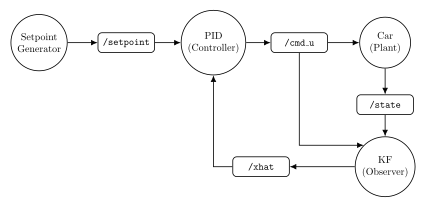
Now we’ll implement this complete system as ROS nodes, demonstrating how the entire feedback loop from the Car Cruise Control theory notebook deploys to ROS.
System Overview:
4 ROS nodes: Setpoint Generator, PID Controller, Plant (Car), Observer (KF)
3 topics:
/setpoint,/cmd_throttle,/velocity_measurement,/estimateComplete closed-loop: Feedback from KF estimate to controller
This demonstrates the full pykal pipeline: Theory → Python → ROS → Hardware
# ============================================================================
# Core Functions from Car Cruise Control Theory Notebook
# ============================================================================

from std_msgs.msg import Float64

# --- Setpoint Generator ---
def setpoint_f(sk: float, bk: float) -> float:
    """Cruise control button: increment/decrement setpoint."""
    return np.clip(sk + bk, 0, 80)  # Limit to [0, 80] mph

def setpoint_h(sk: float) -> float:
    """Output current setpoint."""
    return sk

# --- Plant (Car Dynamics) ---
def plant_f(xk: float, uk: float, m: float, b: float, dt: float) -> float:
    """Car velocity dynamics with drag.

    Args:
        xk: Current velocity (mph)
        uk: Throttle force (N)
        m: Car mass (kg)
        b: Drag coefficient (kg/s)
        dt: Time step (s)
    """
    return xk + dt * (-b / m * xk + uk / m)

def plant_h(xk: float) -> float:
    """Measurement: velocity (noiseless for now)."""
    return xk

# --- PID Controller (simplified from algorithm library) ---
from pykal.algorithm_library.controllers import pid

# --- Kalman Filter (from algorithm library) ---
from pykal.algorithm_library.estimators import kf as KF

# Physical parameters
M_CAR = 1500.0  # Car mass (kg)
B_DRAG = 50.0   # Drag coefficient (kg/s)
DT = 0.1        # Sampling time (s)

# PID gains
KP = 800.0
KI = 50.0
KD = 200.0

# Kalman filter covariances
Q_CAR = np.array([[0.1]])  # Process noise
R_CAR = np.array([[1.0]])  # Measurement noise

print("✓ Cruise control functions defined!")
print(f"  Car: m={M_CAR} kg, b={B_DRAG} kg/s")
print(f"  PID: Kp={KP}, Ki={KI}, Kd={KD}")
---------------------------------------------------------------------------
ModuleNotFoundError                       Traceback (most recent call last)
Cell In[1], line 5
      1 # ============================================================================
      2 # Core Functions from Car Cruise Control Theory Notebook
      3 # ============================================================================
----> 5 from std_msgs.msg import Float64
      7 # --- Setpoint Generator ---
      8 def setpoint_f(sk: float, bk: float) -> float:

ModuleNotFoundError: No module named 'std_msgs'
Node 2: PID Controller
ROS Wrapper Pattern: Subscribes to /setpoint and /estimate, publishes /cmd_throttle.
Algorithm: Discrete-time PID with proportional, integral, and derivative terms
Node 3: Plant (Car Simulator)
ROS Wrapper Pattern: Subscribes to /cmd_throttle, publishes /velocity_measurement.
Dynamics: First-order system with linear drag
Node 4: Kalman Filter Observer
ROS Wrapper Pattern: Subscribes to /velocity_measurement and /cmd_throttle, publishes /estimate.
Algorithm: Linear Kalman filter fusing motion model with measurements
Predict-Update Cycle:
Predict: Use car dynamics and control input
Update: Incorporate noisy velocity measurement
Running the Complete Cruise Control ROS System
Now we initialize all 4 nodes and start the complete closed-loop system:
# Initialize ROS2 (if not already initialized)
if not rclpy.ok():
    rclpy.init()

# Create all nodes
print("Creating cruise control ROS2 nodes...")
setpoint_gen_node.create_node()
controller_node.create_node()
plant_node.create_node()
kf_observer_node.create_node()
print("All nodes created!")

# Start all nodes
print("\nStarting nodes...")
setpoint_gen_node.start()
print("  ✓ Setpoint generator running")
plant_node.start()
print("  ✓ Car plant running")
kf_observer_node.start()
print("  ✓ Kalman filter running")
controller_node.start()
print("  ✓ PID controller running")

print("\n🚗 Car Cruise Control ROS system is live!")
print("\nROS2 Topic Graph:")
print("  /setpoint ← setpoint_generator")
print("     ↓")
print("  pid_controller → /cmd_throttle")
print("     ↓")
print("  car_plant → /velocity_measurement")
print("     ↓")
print("  kalman_filter → /estimate")
print("     ↓ (feedback)")
print("  pid_controller")

print("\n💡 This is the exact system from the Conceptual Foundation diagrams!")
Summary
We’ve covered the complete ROSNode interface:
Part 1: Basic Structure
Simple echo and velocity scaling nodes
Understanding callback signature and return format
Part 2: Stateful Callbacks
Using closures for internal state
Integrators and controllers with memory
Part 3: Multi-Rate Fusion
Staleness policies: zero, hold, drop
Handling sensors with different update rates
Part 4: Error Handling
Required topics for safety
Custom error callbacks for graceful degradation
Part 5: Diagnostics
Performance tracking (counts, rates, latency)
Heartbeat monitoring for sensor health
Part 6: Node Lifecycle
create_node(), start(), stop()
Running multiple nodes
Part 7: DynamicalSystem Integration
Wrapping control algorithms as ROS nodes
Kalman filter deployment example
Next Steps
In the following tutorials, we’ll:
Deploy the TurtleBot state estimation system as ROS nodes
Deploy the Crazyflie sensor fusion system as ROS nodes
Integrate with Gazebo simulation
Visualize node graphs with
rqt_graph
This will demonstrate how the DynamicalSystem architecture maps directly to the ROS node architecture!
:doc:← Python to ROS <index>